

Claude Prompt Caching in Python: A Guide
Claude prompt caching in Python with the Anthropic SDK: where cache_control goes, model minimums, reading usage fields, and the mistakes that cause misses.
By OceanToken Team
Editor's note: Prompt caching is the biggest cost lever most Claude apps leave off. Any app that resends a long, stable prefix within a few minutes should use it, and should prove it works by reading the usage fields, not by assuming. We'd also put it ahead of shopping for a cheaper route: caching depends on how you lay out the request, and no rate card does that part for you.
Short answer: For Claude prompt caching in Python, use the Anthropic SDK, put cache_control: {"type": "ephemeral"} on the last block of the stable part of your prompt (tools, system, long documents), keep that prefix byte-identical between calls, and check cache_read_input_tokens in response.usage. The OpenAI-compatible route doesn't support caching, per Anthropic.

How the mechanism works
Anthropic's prompt caching docs say a cache covers the whole prompt in a fixed order, tools, then system, then messages, up to and including the block you mark with cache_control. On the next request the API looks for a matching prefix, checking at most 20 positions back from each breakpoint. You can set up to four breakpoints, which helps when sections change at different rates, for example tools that never change and a document that changes daily.
The default lifetime is five minutes, refreshed at no extra cost each time the entry is read. You can ask for one hour with "ttl": "1h". Writes cost more than plain input and reads cost much less: Anthropic lists a 5-minute write at 1.25 times the base input price, a 1-hour write at 2 times, and a read at 0.1 times, with reads at 0.05 times on Claude Opus 5.5 and Sonnet 5.5.
Minimum sizes matter more than people expect. Anthropic's table, checked November 8, 2026:
| Minimum cacheable prompt | Models |
|---|---|
| 512 tokens | Opus 5.5, Sonnet 5.5, Haiku 5.5, Opus 5, Fable 5.1, Fable 5 |
| 1,024 tokens | Opus 4.8, Sonnet 5, Sonnet 4.6, Sonnet 4.5 |
| 2,048 tokens | Opus 4.7 |
| 4,096 tokens | Opus 4.6, Opus 4.5, Haiku 4.5 |
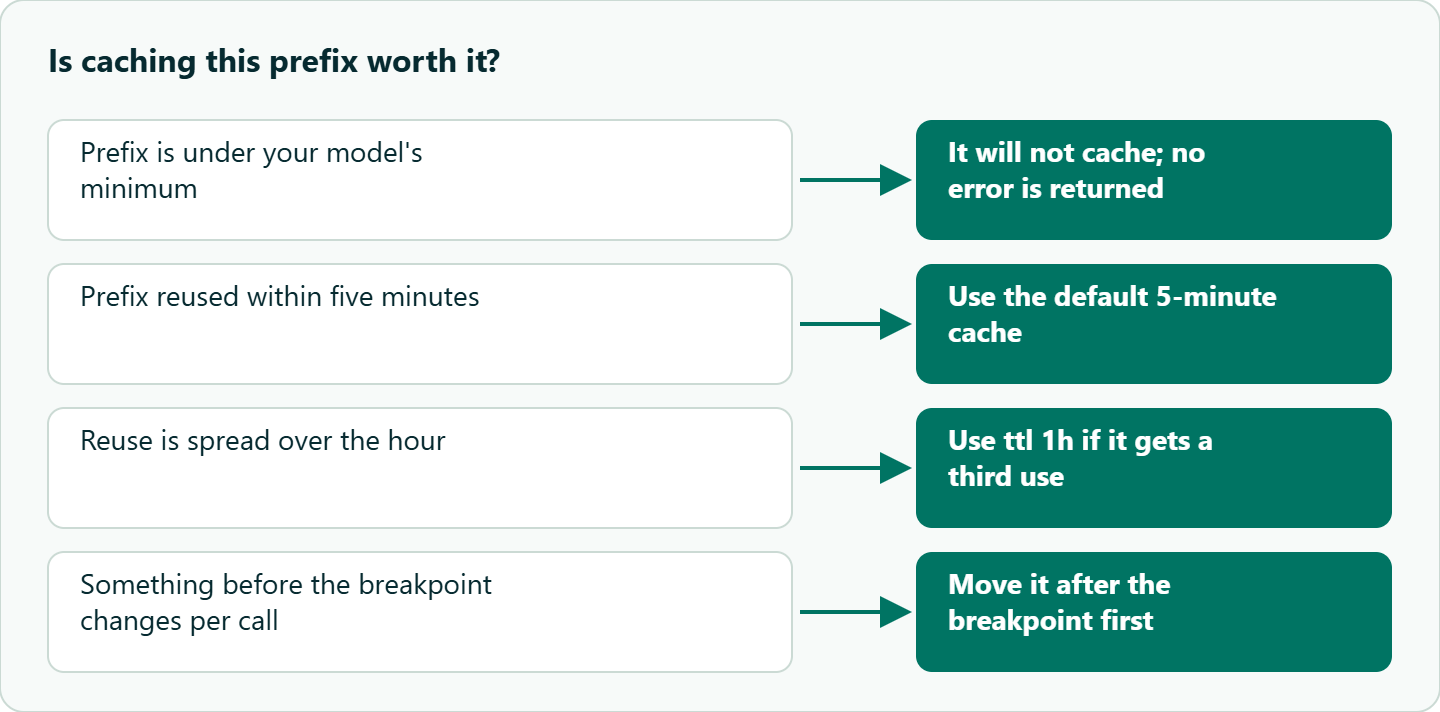
A shorter prefix is processed without caching, and no error is returned. That silence is the most common reason someone turns caching on and sees nothing change.
Step by step
Use the Anthropic SDK, not the OpenAI one. Anthropic's OpenAI SDK compatibility page says prompt caching is not supported there and points to the Anthropic SDKs instead.
import os
import anthropic

client = anthropic.Anthropic(
    base_url="https://api.oceantoken.ai",       # Anthropic SDK: no /v1
    api_key=os.environ["OCEANTOKEN_API_KEY"],
)

POLICY = open("support_policy.md").read()      # several thousand tokens, rarely changes

def ask(question: str) -> str:
    resp = client.messages.create(
        model="anthropic/claude-opus-5.5",
        max_tokens=400,
        system=[{
            "type": "text",
            "text": POLICY,
            "cache_control": {"type": "ephemeral"},   # breakpoint after the stable part
        }],
        messages=[{"role": "user", "content": question}],
    )
    u = resp.usage
    print(u.input_tokens, u.cache_creation_input_tokens, u.cache_read_input_tokens)
    return resp.content[0].text

ask("How do refunds work?")        # expect cache_creation_input_tokens > 0
ask("What about subscriptions?")   # expect cache_read_input_tokens > 0
The question goes after the breakpoint because it changes every call. If you're calling Anthropic directly, drop base_url and use Anthropic's id, claude-opus-5-5.
Reading the usage fields
| Field | Meaning |
|---|---|
input_tokens |
Tokens after the last breakpoint, neither read from nor written to cache |
cache_creation_input_tokens |
Tokens written to the cache on this call |
cache_read_input_tokens |
Tokens served from the cache |
Anthropic gives the total input as the sum of all three. People often read input_tokens alone, see a small number, and think the request shrank, when it only counts the uncached tail. If cache_read_input_tokens stays at zero on the second call, caching isn't happening. Print the fields; don't guess.
Claude prompt caching in Python with automatic caching
For multi-turn chat there is a simpler option. Anthropic documents automatic caching: put one cache_control at the top level of the request and the system places the breakpoint on the last cacheable block and moves it forward as the conversation grows.
resp = client.messages.create(
    model="anthropic/claude-opus-5.5",
    max_tokens=1024,
    cache_control={"type": "ephemeral"},
    system="You are a support assistant.",
    messages=history,
)
It uses one of the four breakpoint slots. We'd still mark long, stable blocks explicitly, such as tool definitions or a reference document, because you then know exactly what is cached and can see it in the usage fields.
Worked example: when it pays
Take a 10,000-token prefix used 50 times within five minutes on Opus 5.5. You pay one write at 1.25 and 49 reads at 0.05, which is 3.7 prefix-equivalents instead of 50. Even two uses come out ahead: 1.25 plus 0.05 is 1.3 against 2. The 1-hour cache costs 2 to write, so it needs a third use within the hour to beat sending the prefix uncached. These are ratios from Anthropic's published multipliers, not prices; check the multiplier for your model before you plan around them.
Common mistakes
A timestamp or user name before the breakpoint. One changed character in the prefix breaks the match. Move anything per-request after the breakpoint.
Changing tool definitions. Anthropic's invalidation table says modifying tool names, descriptions or parameters invalidates the entire cache, since tools come first. Serialise tools in a stable order, and don't rebuild the list with a different key order on each request. Changes to tool_choice, images or thinking settings also invalidate the message-level cache.
A prefix under the minimum. 400 tokens never caches on any current model. Check the table above before debugging anything else.
Parallel first calls. Anthropic says a cache entry only becomes available after the first response starts. Fifty requests fired at once all pay the write. Send one warm-up call, wait for it to start returning, then fan out.
Traffic gaps longer than the TTL. If calls arrive more than five minutes apart, every call is a fresh write. Use the 1-hour TTL, or batch the work closer together.
Assuming the route passes it through. Confirm that the route you use, OceanToken included, forwards cache_control and returns the cache fields; no OceanToken doc we checked confirms it either way, so treat it as something to test. The two-call script above is that test. For the wider trade-offs between calling Anthropic directly and using a multi-model endpoint, see Claude API: Anthropic direct vs gateway.
Monitoring in production
Track three numbers per endpoint. Cache read ratio, which is read tokens over total input tokens, tells you how much of your prompt is actually reused. Write amplification, creation tokens over read tokens, tells you whether you keep paying write premiums for prefixes nobody reads again; if it is high, shrink the cached region to what is truly shared or lengthen the TTL. Cold-start share, the fraction of calls with zero cache reads, tells you whether traffic gaps are expiring your cache. Anthropic also notes that cache hits are not deducted against your rate limit, so a good read ratio buys throughput as well as savings.
How to test this on your workload
We haven't published measurements for this guide. Run these against your own prompts:
- Run the two-call script and record all three usage fields on each call.
- Shorten the cached block below your model's minimum and confirm
cache_creation_input_tokensdrops to zero with no error. - Add a timestamp before the breakpoint and watch reads stop.
- Fire five parallel first calls, then repeat with one warm-up call first, and compare write tokens.
Our take: Cache first, compare routes second. Put stable content first and mark its last block, keep per-request text after it, and log the three usage fields from day one. A cache you haven't seen in usage doesn't exist.
Running it on OceanToken
Use the Anthropic SDK with base URL https://api.oceantoken.ai (no /v1) and model anthropic/claude-opus-5.5; the /claude-api page says Claude models answer on the Anthropic Messages API there, and the Claude Opus 5.5 model page lists prompt caching, billed at the official price. One API key and one prepaid balance also reach the other model families through the OpenAI-compatible base URL https://api.oceantoken.ai/v1, with no subscription, and each key can have its own spending limit, which is useful for keeping a caching experiment bounded. Run the two-call test first and confirm the cache fields come back on your route. See the current rate on /claude-api.
FAQ
Do I need a beta header for prompt caching? The current docs show cache_control with type ephemeral and an optional ttl with no beta header; check the caching page if you use an older SDK.
Can I cache tool definitions and images? Yes. Blocks in tools, system and messages can carry a breakpoint, but changing tools invalidates the whole cache.
How do I know a cache hit happened? cache_read_input_tokens is greater than zero in response.usage.
Why is nothing cached even with cache_control set? Usually the prefix is under the model's minimum, which fails silently, or something before the breakpoint changes between calls.
Does caching work with the OpenAI SDK? Anthropic says prompt caching is not supported on its OpenAI compatibility layer. Use the Anthropic SDK.
Sources
- Anthropic: prompt caching (checked 2026-11-08)
- Anthropic: OpenAI SDK compatibility (checked 2026-11-08)
- Anthropic: models overview (checked 2026-11-08)
- OceanToken Claude API page (checked 2026-11-08)
- OceanToken Claude Opus 5.5 model page (checked 2026-11-08)
- OceanToken docs: text generation (checked 2026-11-08)
Get your OceanToken API key
- Create an OceanToken account and an API key.
- Copy the snippet below, paste your key, and run it.
- Check the current rate on /claude-api.
curl https://api.oceantoken.ai/v1/messages \
  -H "Authorization: Bearer $OCEANTOKEN_API_KEY" \
  -H "Content-Type: application/json" \
  -d '{"model": "anthropic/claude-opus-5.5", "max_tokens": 400, "system": [{"type": "text", "text": "Long stable instructions go here.", "cache_control": {"type": "ephemeral"}}], "messages": [{"role": "user", "content": "Hello"}]}'
More from the blog
A Unified API for Chat, Image and Video
Building on a unified API for chat, image and video: sync vs async calls, billing units, retries, timeouts and storage, with three calls and a launch checklist.
Kimi K3 API International Access Guide
Use the Kimi K3 API internationally: sign up with email, pay by card, create one key and call moonshotai/kimi-k3 with an OpenAI SDK. Steps, code and checks.
Call Tencent Hy3 With the OpenAI SDK
Call Tencent Hy3 with the OpenAI SDK outside China: base URL, model id, streaming, tool calls, reasoning_effort values, Hy3 vs Hy3 preview, and token billing.