

Limit LLM API Spend With a Prepaid Balance
Limit LLM API spend with a prepaid balance plus four more guardrails: per-key credit limits, caps in code, cost checks before video jobs, and a daily review.
By OceanToken Team
Editor's note: The most useful billing feature for a small team is the boring one: money you cannot overspend because it is not sitting on a card. Alerts tell you about the damage the next morning. A credit limit on every key, a few lines of code and a small prepaid balance stop it while it is happening, in that order.
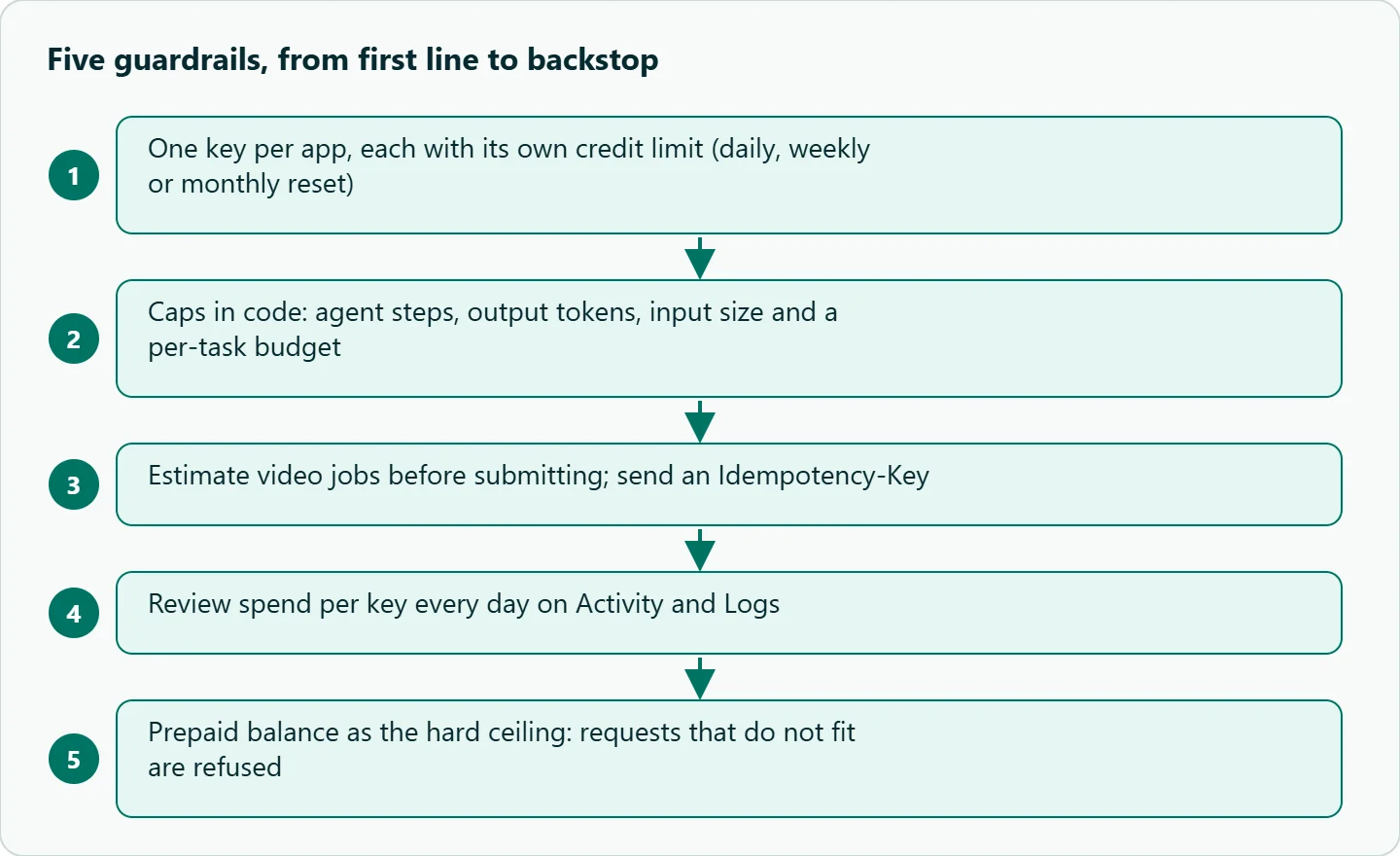
Short answer: To limit LLM API spend, use a prepaid balance as the hard ceiling, give every app its own key with a credit limit, cap output tokens and agent steps in code, estimate the cost of expensive jobs before you submit them, and review spend per key every day. None of it needs extra tooling.
Why LLM API spend runs away
Most surprise bills come from four places, and none of them look dangerous while you build.
Agent loops. A tool-using agent retries a failing step again and again, and every retry resends a longer context. Cost grows faster than the step count, because each step pays for all the steps before it.
Context growth. Even without a bug, a long chat or agent session pays for its whole history on every turn. A prompt that accidentally includes a large file does the same in a single call.
Leaked keys. Anyone holding your key spends your balance. A key committed to a public repo or pasted into a shared notebook is the classic case.
Video retries. Video is billed per job, usually by length and resolution, so a batch submitted twice or a retry loop without a limit adds up quickly. We walked through how that plays out in a priced holiday-campaign example in our Black Friday video ad cost breakdown.
Guardrail 1: one key per app, each with a credit limit
This is the guardrail we would set up first. Give production, each developer tool and each experiment its own key. The API keys docs say a key can carry a credit limit that caps its total spend, taken from your credits rather than added to them, and the FAQ adds that the limit can reset daily, weekly or monthly. A key that hits its limit stops working and returns 400 key_budget_exceeded, while the account and every other key keep running.
That isolation is the point. A runaway agent on the "experiments" key stops at its own daily limit and cannot drain the balance that production depends on. Names are unique per account, so name keys after the thing that uses them (prod-support-bot, dev-cursor-alex); when a spike shows up, the name tells you where to look. Keys can also expire, which suits short projects and contractors.
When a key leaks, delete it rather than rotate it. The docs say deletion is immediate and requests return 401 from then on, while a rotated key's old secret keeps working for 24 hours. For a leaked key, 24 hours is a long time.
Guardrail 2: caps in code
Platform limits catch the disaster. Code limits catch the ordinary bug before it reaches the platform limit. Three caps cover most cases: a maximum number of agent steps, a maximum output per call, and a per-task budget computed from the usage the API returns.
import os
from openai import OpenAI

client = OpenAI(base_url="https://api.oceantoken.ai/v1", api_key=os.environ["OCEANTOKEN_API_KEY"])

MAX_STEPS = 12
MAX_OUT = 2000                        # reasoning tokens count toward this
MAX_INPUT_TOKENS = 60_000             # refuse oversized prompts before sending
TASK_BUDGET = float(os.environ["TASK_BUDGET_USD"])
P_IN = float(os.environ["PRICE_IN_PER_M"])    # copy from /deepseek-api; use the higher figure if unsure
P_OUT = float(os.environ["PRICE_OUT_PER_M"])

def run_agent(messages):
    spent = 0.0
    for step in range(MAX_STEPS):
        est = sum(len(str(m.get("content") or "")) for m in messages) // 4  # rough: 4 chars per token
        if est > MAX_INPUT_TOKENS:
            raise RuntimeError("prompt too large, not sent")
        r = client.chat.completions.create(model="deepseek/deepseek-v4.1-flash",
                                           messages=messages, max_tokens=MAX_OUT)
        u = r.usage
        if u.prompt_tokens > MAX_INPUT_TOKENS:  # catch growth the estimate missed
            raise RuntimeError("context too large, stopping")
        spent += (u.prompt_tokens * P_IN + u.completion_tokens * P_OUT) / 1e6
        if spent > TASK_BUDGET:
            raise RuntimeError(f"budget hit at step {step}")
        # ... handle tool calls, append the assistant message, continue
    raise RuntimeError("step cap hit")
Prices live in configuration, not in code, so a rate change never silently breaks the math. Cached input is billed differently from fresh input, so overestimate rather than underestimate. Set the task budget at a small multiple of what a normal task costs on your logs; a loop shows up as a task that costs many times the usual.
The loop checks prompt size before sending, not only after. A rough count (characters divided by four for English) is enough to refuse a prompt that accidentally includes an entire file; the check after the call catches growth the estimate missed.
Guardrail 3: estimate before you submit a video job
For video, the formula is simple: clip length times the rate for that model and resolution, times the number of clips. Look up the rate on the model's page, for example /seedance-api, and block any batch whose estimate is above a threshold until a person approves it.
The platform helps here too. The FAQ says long jobs such as video hold their estimated cost until they finish, and an attempt that fails before producing output is not billed. The video guide adds that a failed job's hold is released. Video jobs also accept an Idempotency-Key, so a retry after a network timeout returns the existing job instead of starting a second billed one. Always send it.
Guardrail 4: a daily look at spend per key
The FAQ says the Activity page shows spend per day and per model, and the Logs page lists each request with its model, tokens, cost, latency and the API key that made it, for the last 24 hours or 7 days. Spend two minutes on it every morning, and once a week sort by cost and read the five most expensive requests. They usually point at the next cap to add.
Rate limits are a separate control. The FAQ says they apply per key as requests and tokens per minute, and a key over its limit gets 429 rate_limited with a Retry-After header. Honor that header in your retry logic; our 429 troubleshooting guide covers backoff in detail.
Guardrail 5: limit LLM API spend with a prepaid balance backstop
A prepaid balance is the backstop. On OceanToken, the FAQ says every request deducts its exact cost from the balance, a request must fit in what remains or it is refused with 400 request_exceeds_balance, and at or below zero every request to a paid model is refused until you add credits. That is a hard ceiling no bug can push through.
The trade-off is the opposite failure: when the balance runs dry, production stops too. So top up in amounts you could write off, and treat the balance as the last line, not the only one. Purchased credits are valid for 12 months from purchase, according to the same FAQ, so there is no reason to load a year of spend at once.
Failure cases and the guardrail that catches each
| Case | What happens | Guardrail that catches it |
|---|---|---|
| Agent retries the same failing tool call | Context and cost grow each turn | Step cap, per-task budget, per-key limit |
| Test script left in a cron job | Quiet daily spend | Daily per-key review, key expiration |
| Key committed to a public repo | Strangers spend your balance | Per-key limit, delete the key, small balance |
| Prompt accidentally includes a large file | One very large call | Input-token check before sending |
| Video batch submitted twice | Double charges | Approval threshold, Idempotency-Key |
How to test this on your workload
We have not run these against your traffic, so treat them as a checklist:
- Create a test key with a small daily credit limit and point a deliberately broken agent at it. Confirm it stops with
key_budget_exceeded. - Run the capped loop above on a task designed to fail, and confirm it stops at the step cap or budget.
- Send a prompt above
MAX_INPUT_TOKENSand confirm your code refuses it. - Submit a video job twice with the same
Idempotency-Keyand confirm one job comes back. - Measure your normal task cost from Logs over a week, then set budgets from that number.
Our take: Set guardrails in this order: a credit limit on every key, step and token caps in code, a cost check before video jobs, a daily review, and a balance small enough to lose as the backstop. The first two stop most incidents at the source. The balance only matters when everything else failed, and that is exactly when you want it to be small.
Running it on OceanToken
The guardrails above map directly onto the account. The base URL is https://api.oceantoken.ai/v1, the model in the code is deepseek/deepseek-v4.1-flash (DeepSeek V4.1 Flash model page, priced on DeepSeek API pricing), and video models such as Seedance are on /seedance-api. See the current rate on each page.
What makes this easier here: billing is prepaid with no subscription, so the balance is a real ceiling. Every key can have its own credit limit with an optional daily, weekly or monthly reset. One key and one balance cover text and video models, so you are not managing limits across several vendor accounts. The API is OpenAI-compatible, so the capped loop above needs only the base URL and the key.
FAQ
How do I stop an agent loop from spending too much? Cap steps and output tokens in code, track spend per task from usage, and run the agent on a key with its own daily credit limit.
Is a prepaid balance safer than a card? For overspend, yes. When the balance can't cover a request, the request is refused instead of charged.
What should I do if my key leaks? Delete it in the console; deletion takes effect immediately, while rotation leaves the old secret working for 24 hours.
Should I set a limit per key or rely on the balance? Both. The key limit finds and stops the culprit; the balance is the backstop for everything else.
How big should the prepaid balance be? Big enough for normal spend between top-ups, small enough that losing it would hurt but not sink you.
Sources
- OceanToken docs: FAQ (checked 2026-11-10)
- OceanToken docs: API keys (checked 2026-11-10)
- OceanToken docs: Logs (checked 2026-11-10)
- OceanToken docs: Video guide (checked 2026-11-10)
- OceanToken DeepSeek API page (checked 2026-11-10)
Get your OceanToken API key
- Create an OceanToken account and an API key.
- Copy the snippet below, paste your key, and run it.
- Check the current rate on /deepseek-api.
curl https://api.oceantoken.ai/v1/chat/completions \
  -H "Authorization: Bearer $OCEANTOKEN_API_KEY" \
  -H "Content-Type: application/json" \
  -d '{"model": "deepseek/deepseek-v4.1-flash", "max_tokens": 2000, "messages": [{"role": "user", "content": "Summarize why per-key spending limits matter in one sentence."}]}'
More from the blog
A Unified API for Chat, Image and Video
Building on a unified API for chat, image and video: sync vs async calls, billing units, retries, timeouts and storage, with three calls and a launch checklist.
Kimi K3 API International Access Guide
Use the Kimi K3 API internationally: sign up with email, pay by card, create one key and call moonshotai/kimi-k3 with an OpenAI SDK. Steps, code and checks.
Call Tencent Hy3 With the OpenAI SDK
Call Tencent Hy3 with the OpenAI SDK outside China: base URL, model id, streaming, tool calls, reasoning_effort values, Hy3 vs Hy3 preview, and token billing.