

GPT Empty Response? Fix max_output_tokens
Why a GPT reasoning model gives an empty response when max_output_tokens is too low: reasoning tokens use the cap first. How to detect and fix it.
By OceanToken Team
Editor's note: An empty reply from a reasoning model often gets reported as "the API is broken," and it is not a bug. It is a token budget set for the old chat-model world. A
max_tokens=256copied from a tutorial will fail silently on GPT-6, and you still pay for it. We think every app that calls a reasoning model should log the finish reason on every call.
Short answer: A GPT reasoning model empty response with a low max_output_tokens usually means hidden reasoning used up the cap before any visible text. Raise the cap (OpenAI suggests reserving at least 25,000 tokens while experimenting), pair it with lower effort on easy tasks and a per-key spend limit, and check the finish reason before reading the content.
Why reasoning tokens eat your max tokens
OpenAI's reasoning guide says reasoning tokens "are not visible via the API," yet they still occupy space in the context window and are billed as output tokens. The model thinks first, then writes. Both draw on one budget.
That budget has a different name in each API. In the Responses API it is max_output_tokens. In Chat Completions it is max_completion_tokens, which the API reference describes as an upper bound on generated tokens, visible output and reasoning combined. The older max_tokens is deprecated there and "not compatible with o-series models," so code written for GPT-4-era chat models is the usual source of this bug.
The guide's own example shows how lopsided the split can be: an answer with 1,186 output tokens, of which 1,024 were reasoning. Put a 1,000-token cap on that request and the model can run out while still thinking.
Spotting a GPT reasoning model empty response at max_output_tokens
The signals differ by endpoint, so check the one you call.
| Endpoint | What you see when the cap is hit | Where reasoning shows up |
|---|---|---|
| Responses API | status: "incomplete", incomplete_details.reason: "max_output_tokens" |
usage.output_tokens_details.reasoning_tokens |
| Chat Completions | finish_reason: "length" |
usage.completion_tokens_details.reasoning_tokens |
OpenAI warns that the incomplete case "might occur before any visible output tokens are produced." That is the empty reply: you pay for input and reasoning and get a blank string. A close cousin is truncated JSON. With structured output the cap can cut the document mid-field, so the reply is not empty but will not parse. The structured outputs guide's examples check finish_reason == "stop" (or the response status) before reading the parsed result, and you should do the same.
The fix, in order
Raise the cap first, and know what that trades. Start near the 25,000 tokens OpenAI suggests for experiments. On an easy prompt a high cap costs nothing extra, because the model stops when it is done. On a prompt that sends the model into long thinking, though, it lets one request bill up to that many output tokens, and users wait for all of it. That is why the high starting cap comes with the next two steps, lower effort and a spend limit, and why you tune the cap down per route after a week of logs.
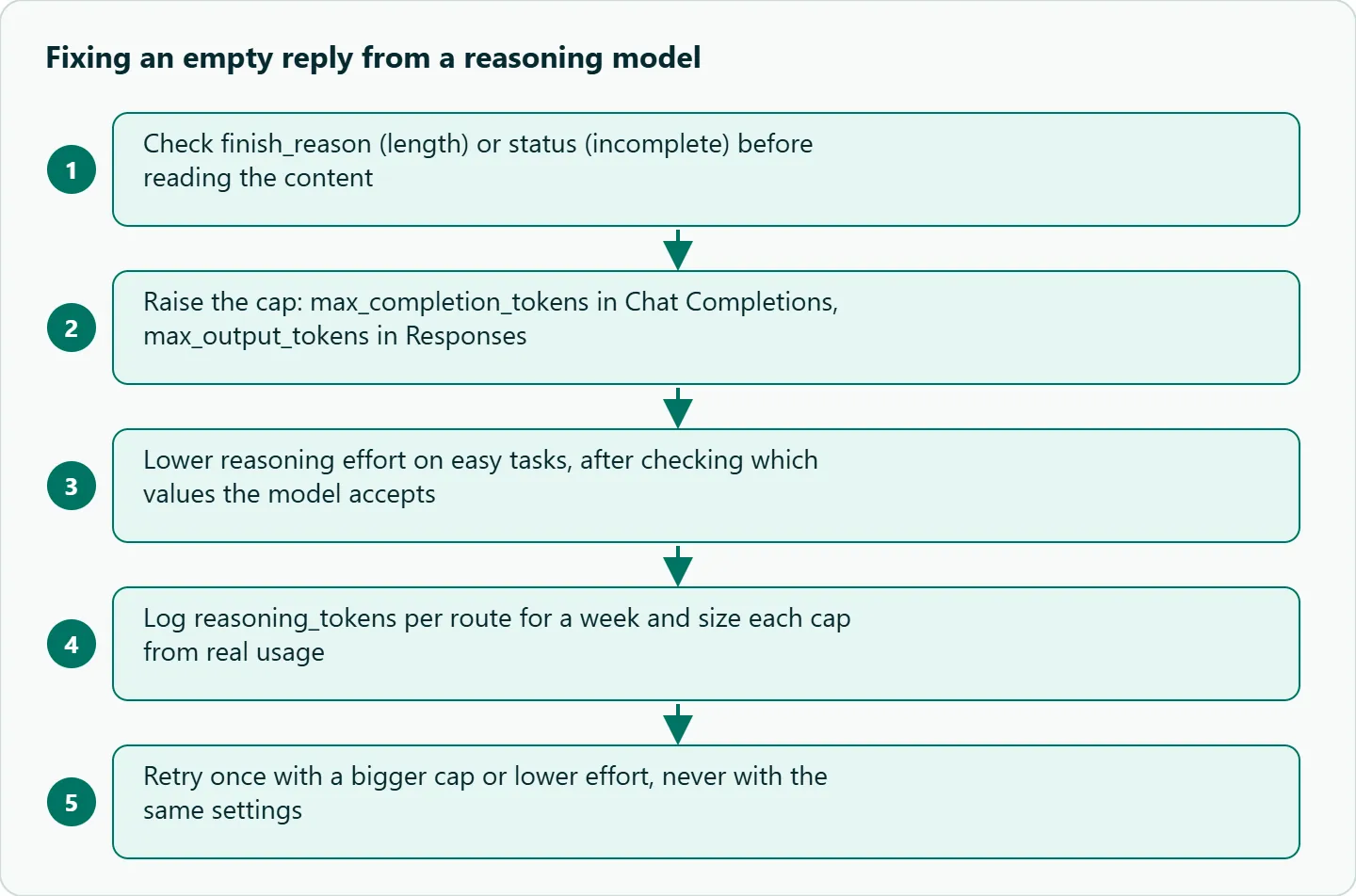
Then lower the effort where the task is easy. In Chat Completions, reasoning_effort defaults to medium, and the reference says lower effort means "fewer tokens used on reasoning." The guide lists none, minimal, low, medium, high, xhigh and max, but support depends on the model. It gives one concrete case: none on GPT-6 Astra returns HTTP 400. So test each value on each model id you use.
Log usage per route. Record reasoning tokens next to your route name for a week. Usually one route, often a classifier or a short rewrite, burns far more thinking than it needs.
Handle the incomplete case on purpose. Retry once with a bigger cap or a lower effort. Do not retry with the same settings, because the same request will fail the same way and bill again.
Our take: Start with a cap high enough for the model to finish, control cost with reasoning effort and a per-key spend limit, then lower each route's cap to what your logs show it needs. That keeps the cap as a guard against runaway requests without letting it fail silently. A tiny cap is the worst of both: you pay for thinking and ship an empty box to the user.
Failure cases to plan for
A frequent cause is the tutorial default. A max_tokens=256 from a chat-model example is enough for a short answer from GPT-4o, and not enough for a model that thinks first. Close behind it is the wrong parameter name: sending max_tokens to a newer reasoning id, or max_completion_tokens to the Responses API, either errors or does not apply the limit you meant, so match the name to the endpoint.
The other two show up after launch. A client that retries on empty output with the same cap repeats the failure and pays each time, so allow one retry with changed settings and then stop. And if you stream, a stream can finish with no text delta; show "no answer produced, retrying" rather than an empty bubble, so the user knows something happened.
How to test this on your workload
- Pick one real prompt from each route you run.
- Send it with
max_completion_tokensof 200, 2,000 and 25,000 at your usual effort. - Record
finish_reason, content length andreasoning_tokensfor each. - Repeat at one lower effort level and compare.
- Set each route's cap from what you measured, with headroom.
Running it on OceanToken
On OceanToken, set the base URL to https://api.oceantoken.ai/v1 and use the model id as written. The /gpt-api page listed openai/gpt-6.1-sol, openai/gpt-6-luna, openai/gpt-6-astra and older GPT ids on 2026-11-06. See the current rate on /gpt-api.
Two things on that page help with this exact bug. The API is OpenAI-compatible, so you change the base URL and the key and keep the code below. And each API key can have its own spending limit, so a retry loop on one route cannot drain the balance for the rest of your app. Billing is prepaid with no subscription. The page's example passes only model and messages, so confirm on your first call that usage.completion_tokens_details comes back before you build alerts on it.
from openai import OpenAI

client = OpenAI(base_url="https://api.oceantoken.ai/v1", api_key="YOUR_OCEANTOKEN_KEY")

def safe_call(prompt, cap=25000, effort="medium"):
    r = client.chat.completions.create(
        model="openai/gpt-6.1-sol",
        reasoning_effort=effort,
        max_completion_tokens=cap,
        messages=[{"role": "user", "content": prompt}],
    )
    choice = r.choices[0]
    if choice.finish_reason == "length" or not choice.message.content:
        d = r.usage.completion_tokens_details
        print("cap hit; reasoning tokens:", d.reasoning_tokens if d else "n/a")
        if cap < 50000:
            return safe_call(prompt, cap=cap * 2, effort="low")
        return None
    return choice.message.content
FAQ
Why is the content empty but I was still billed? Reasoning tokens bill as output even when no visible text is produced. The cap ran out during the thinking.
Should I use max_tokens or max_completion_tokens? In Chat Completions, use max_completion_tokens; max_tokens is deprecated. In the Responses API, use max_output_tokens.
How big should the cap be? OpenAI suggests reserving at least 25,000 tokens while you experiment. Tune it down per route after you log real usage.
Does lowering reasoning effort fix it? Often, for simple tasks, because it reduces reasoning tokens. Check which effort values your model accepts first.
How do I see reasoning token counts? In usage.completion_tokens_details.reasoning_tokens (Chat Completions) or usage.output_tokens_details.reasoning_tokens (Responses).
Sources
- OpenAI: Reasoning models guide (checked 2026-11-06)
- OpenAI API reference: Create chat completion (checked 2026-11-06)
- OpenAI: Structured outputs guide (checked 2026-11-06)
- OceanToken GPT API page (checked 2026-11-06)
Get your OceanToken API key
- Create an OceanToken account and an API key.
- Copy the snippet below, paste your key, and run it.
- Check the current rate on /gpt-api.
curl https://api.oceantoken.ai/v1/chat/completions \
  -H "Authorization: Bearer $OCEANTOKEN_API_KEY" \
  -H "Content-Type: application/json" \
  -d '{"model": "openai/gpt-6.1-sol", "max_completion_tokens": 25000, "messages": [{"role": "user", "content": "Hello"}]}'
More from the blog
Hailuo Video Problems: 10 Fixes by Symptom
Hailuo video problems sorted by symptom: morphing faces, static or frantic motion, ignored camera moves, refused requests. Causes, fixes and a triage table.
Kling Hands and Faces Artifacts: Fixes
Kling hands and faces artifacts in one shot: extra fingers, merged grips, face morphing, teeth. A five-minute frame check and prompt fixes from Kling's guides.
Seedance Face Rejected? Why and What to Do
Seedance face rejected? Real-person photos, public figures and some prompts trip the content filter. How to read content_filtered and fix the input honestly.