

Seedance Generation Failed? Causes and Fixes
Seedance generation failed? Work through policy, settings, input and capacity causes in order, and use a retry pattern that never pays for the same clip twice.
By OceanToken Team
Editor's note: Seedance 2.0 drew criticism within days of launch for weak guardrails on real people's likeness, so expect strict policy checks on faces. When a Seedance generation failed, it is usually one of a few boring things: a policy block, an unsupported setting, a bad input or a busy platform. Check the cheapest cause first. The costliest mistake is resubmitting a slow job and paying for two.
Short answer: If your Seedance generation failed, check in this order: a policy block (real faces or named people), an unsupported setting (duration or resolution the model does not offer), a bad input (unreachable or oversized media), then platform load. Retry only after the task is truly failed.
Know the task lifecycle first
Seedance runs as an async task. On our API you create a job with POST /v1/videos, poll GET /v1/videos/{id}, and download from GET /v1/videos/{id}/content. The video guide lists the status values: queued, then in_progress, then completed or failed. A failed job carries an error with a code and a message.
"Slow" is not "failed." A video job can sit in the queue for a while when demand is high, and a status of queued only means it has not started yet. Set your own timeout generously before you call a job dead, and keep polling the same id instead of creating a new one.
Seedance task failed: the checklist
1. Read the error code. The video guide lists content_filtered (moderation refused the prompt, a reference or the result), invalid_request (parameters refused or a reference could not be read), rate_limited, timeout, temporarily_unavailable and generation_failed. Our working assumption, not a measured rule, is that a job failing at once points to a setting or policy problem, and one failing after it ran points to load or a timeout.
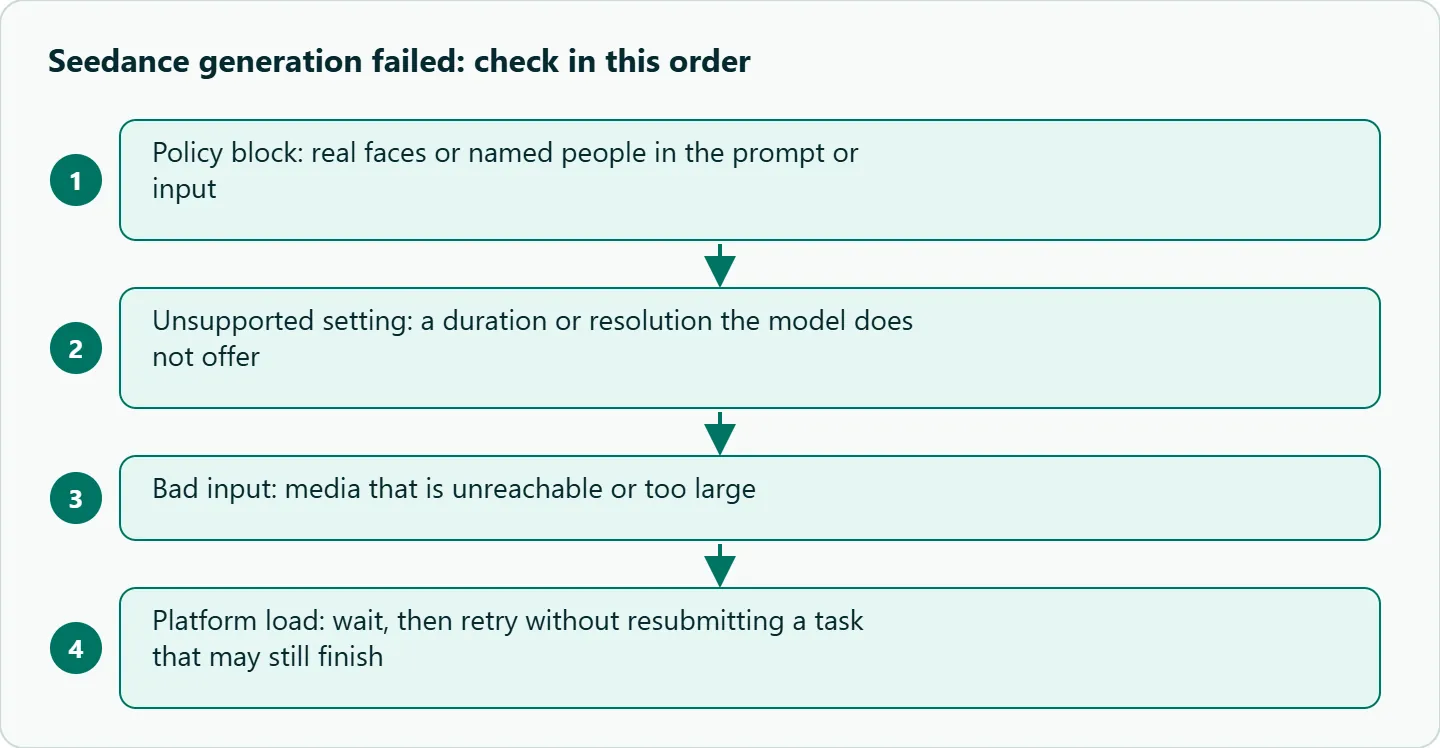
2. Policy. Real people need extra steps. ComfyUI's partner docs say verification is required before any real person can appear in a Seedance 2.0 generation. Try a generic description or an illustrated subject, or use a verified asset flow.
3. Duration and resolution. Ask only for what your model id offers:
| OceanToken id | Resolution | Duration |
|---|---|---|
bytedance/seedance-2.0-upscaled, bytedance/seedance-2.5-upscaled |
720p, 1080p | 4 to 15 s |
bytedance/seedance-2.5 (Native) |
480p, 720p | Up to 30 s |
bytedance/seedance-2.0-upscaled-4k, bytedance/seedance-2.5-upscaled-4k |
4K ("4k" only) |
See /seedance-api |
4K is self-serve on these two ids (/seedance-api, checked 2026-11-09). The page gives two different duration ranges for 2.5 at 4K, so take the limit from the page on the day you build. The Seedance 2.5 model page also lists 1080p for native 2.5, which /seedance-api does not, so confirm resolution there too.
4. Inputs. Unreachable URLs, broken base64 and wrong formats all fail. Before you retry, confirm that every input media URL is public and downloads quickly. Open it from a clean browser session with no login, because a link that only works for you will not work for the renderer.
5. Capacity. Retry once after a pause. Do not hammer the endpoint.
Seedance API error vs a bad result
A failed task and a bad video are different problems. We would expect a contradictory prompt ("static camera, fast orbit") to give you a poor clip rather than an error. Fix that with a clearer prompt, not a retry loop.
Always read the status and the error message in the task body before you change anything. A content filter message means edit the input. A capacity message means wait and retry.
Retry without paying twice
If you resubmit after your own timeout while the first job is still running, you can pay for both. The safe pattern: store the task id the moment you get it, keep polling that id, and resubmit only when the task is terminally failed. For the create call itself, send an Idempotency-Key header: per the video guide , a retried create with the same key does not start a second job.
import os, time, requests

BASE = "https://api.oceantoken.ai/v1"
H = {"Authorization": f"Bearer {os.environ['OCEANTOKEN_API_KEY']}"}

def create(body, key):
    # Same key on a retried create = no second job
    r = requests.post(f"{BASE}/videos", headers={**H, "Idempotency-Key": key},
                      json=body, timeout=60)
    r.raise_for_status()
    return r.json()["id"]

def wait(task_id, max_s=900, every=10):
    t0 = time.time()
    while time.time() - t0 < max_s:
        j = requests.get(f"{BASE}/videos/{task_id}", headers=H, timeout=30).json()
        status = str(j.get("status")).lower()
        if status == "completed":
            return j
        if status == "failed":
            raise RuntimeError(f"task {task_id} failed: {j}")
        time.sleep(every)
    # Do not resubmit here; poll the same id again later.
    raise TimeoutError(task_id)
Log every failed task id with its error body, so you can see which code comes up most.
Cost angle
On our API, the estimated cost is held while the clip renders. If the generation fails, the hold is released and nothing is charged. That covers failures. It does not cover clips that succeed but look wrong, and in our view those rerolls are the part of a video budget worth watching.
To save on those, draft at 720p and short durations, then render the winners at 1080p. See the current rate on /seedance-api.
How to test this on your workload
- Submit a duration outside your id's range and record the error body.
- Submit an unreachable image URL and record the error body.
- Submit a prompt that names a real person and record the error.
- Confirm each failure released its hold in your balance.
- Save the status values and messages as a lookup table for your app.
Our take: Treat "failed" and "bad" as separate problems. Build the checklist into your tooling, log task ids, and never resubmit while the first task might still finish. The cheapest saving is a 720p draft pass.
Running it on OceanToken
Use base URL https://api.oceantoken.ai/v1 with bytedance/seedance-2.5 or the other ids above. Upscaled ids render with ByteDance, then add our super-resolution. Native ids call ByteDance's API directly. One key also covers other video and text models, and the same OpenAI-style base URL works for all of them, so switching models means changing the model id. For a full request with the model ids and settings, see our Seedance API Python quickstart.
FAQ
Do I pay for a failed Seedance generation on OceanToken? No. The hold is released when the generation fails.
How long should I wait before calling a job failed? Longer than you think. Until the status says failed, keep polling the same id instead of creating a new job.
Why was my image rejected? A real person in the image is a common cause. Seedance 2.0 requires verification before a real person can appear.
Should I retry automatically? Once, after a pause, and only after the task is terminally failed.
Sources
- OceanToken Seedance API page (checked 2026-11-09)
- OceanToken video guide (checked 2026-11-09)
- OceanToken Seedance 2.5 model page (checked 2026-11-09)
- ComfyUI docs: Seedance 2.0 real human (checked 2026-11-02)
- TechCrunch: Hollywood isn't happy about the new Seedance 2.0 video generator (checked 2026-11-02)
Get your OceanToken API key
- Create an OceanToken account and an API key.
- Copy the snippet below, paste your key, and run it.
- Check the current rate on /seedance-api.
curl https://api.oceantoken.ai/v1/videos \
  -H "Authorization: Bearer $OCEANTOKEN_API_KEY" \
  -H "Content-Type: application/json" \
  -d '{"model": "bytedance/seedance-2.5", "prompt": "A slow dolly-in on a ceramic mug on a sunlit desk"}'
More from the blog
Hailuo Video Problems: 10 Fixes by Symptom
Hailuo video problems sorted by symptom: morphing faces, static or frantic motion, ignored camera moves, refused requests. Causes, fixes and a triage table.
Kling Hands and Faces Artifacts: Fixes
Kling hands and faces artifacts in one shot: extra fingers, merged grips, face morphing, teeth. A five-minute frame check and prompt fixes from Kling's guides.
Seedance Face Rejected? Why and What to Do
Seedance face rejected? Real-person photos, public figures and some prompts trip the content filter. How to read content_filtered and fix the input honestly.