

Seedance Face Rejected? Why and What to Do
Seedance face rejected? Real-person photos, public figures and some prompts trip the content filter. How to read content_filtered and fix the input honestly.
By OceanToken Team
Editor's note: We think the Seedance filters are annoying and, on balance, defensible. A model that will animate any face on request is a deepfake tool, and Seedance 2.0 drew heavy criticism on exactly that point at launch. So we will not publish bypass tricks. Our advice is to design your workflow around invented, illustrated or properly consented subjects from day one. Where the filter misfires on an innocent input, there are honest fixes, and those are below.
Short answer: If you see "Seedance face rejected," the usual cause is a reference or first-frame image that looks like a real person, a recognizable public figure or character, or a prompt that names one. On OceanToken the refusal comes back as content_filtered and is not charged. Switch to an illustrated, 3D or AI-generated character, crop the face out, or describe instead of naming.
Why a Seedance face gets rejected
The clearest first-party statement we found is on our Seedance 2.5 model page. It says Seedance 2.5 "usually refuses reference images that show a real person," because the model maker's safety check flags them as a possible real person. The same page says illustrated, 3D or AI-generated characters work. So the filter is not looking for a specific famous face. It is looking for anything that reads as a photograph of a real human. If the task failed for another reason, start with Seedance generation failed: the checklist.
Runway's Seedance 2.0 guide says the same thing from the other side: "Public figures are moderated in reference inputs, so an uploaded image of a real, recognizable person may get rejected," while "original or invented characters are safest." The pressure behind this is public. Within days of the 2.0 launch, TechCrunch reported cease-and-desist letters from Disney and Paramount and criticism from the MPA and SAG-AFTRA over real likenesses and studio characters. On February 16, 2026, ByteDance said it was "taking steps to strengthen current safeguards," without saying what they would be. Expect the checks to tighten over time, not loosen.
Where a request can stop
A Seedance request can be refused at more than one point, and knowing which one helps you fix the right thing. Our errors page says requests that trip a safety check return 400 content_filtered, and "the check runs before the model is called, so the request is not charged." The video guide widens the scope: content_filtered means the "prompt, reference, or result" was refused. So a job can also fail after rendering if the output itself is flagged.
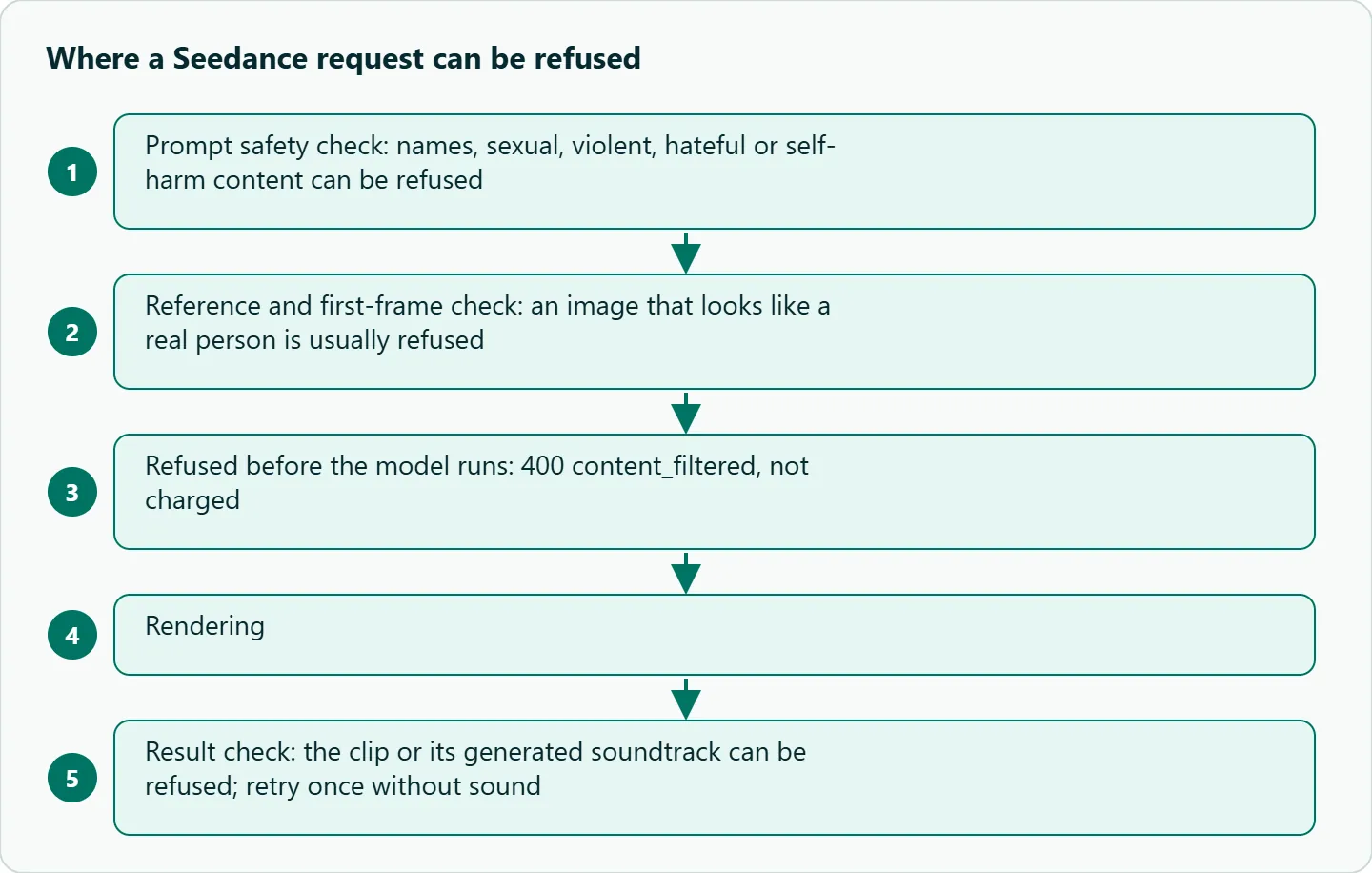
The model page adds two details that catch people out. Every prompt passes a safety check, and clearly sexual, violent, hateful or self-harm content can be refused (sexual content involving minors is always refused). And a clip with generated sound can be refused because of its soundtrack. If a prompt and images look harmless but the job still fails, retry once with generate_audio set to false before you rewrite anything else.
Seedance content filter: common false positives and honest fixes
Most rejections we hear about are not attempts at impersonation. They are ordinary inputs that happen to contain a face. The table lists the usual suspects and the fix that does not involve disguising anyone.
| What you sent | Why it likely tripped | Honest fix |
|---|---|---|
| A photoreal portrait as the first frame or reference | Reads as a real person | Use an illustrated, 3D or AI-generated character, or a non-face subject |
| A product photo with a model's face at the edge | Any face in the image counts | Crop the face out before upload |
| Stylized art that closely resembles a known person | Similarity to a real face | Change the design or reframe away from the face |
| A prompt with a celebrity, politician or franchise name | Prompt check | Describe the role instead: "a caped hero," "a veteran astronaut in her fifties with short gray hair" |
| A mannequin or doll with a realistic face | Can read as a human face | Use a stylized mannequin, or shoot from behind |
| Sound-on clip that otherwise looks fine | Soundtrack check | Retry with generate_audio: false |
Notice what is missing: ways to make a real person's photo slip past the scan. Using someone's likeness without consent is the thing the filter exists to stop, and a workaround is a rights problem even when it works.
Seedance real person reference: is there a consent route?
For Seedance 2.0, there is one in ByteDance's own tooling. ComfyUI's partner documentation says "verification is required before any real person can appear in a Seedance 2.0 generation." The flow runs through ByteDance: you upload a portrait, open a verification link, and complete a liveness check that takes under a minute. ByteDance then returns an id for the verified person and compares later images of that person against it. The stated purpose is to prevent "impersonation and unauthorized use of someone's likeness."
We found no equivalent identity-verification flow for Seedance in our docs as of November 8, 2026. In practice that means real-person references here should be expected to be refused. If your project depends on a specific real person (a founder video, a consenting actor), plan that shot outside the generated footage or use a verified flow where the model maker offers one, and get the person's written consent either way.
How to design around the filter
Start from synthetic subjects. Generate your character with an image model, keep it consistent, and use that image as the reference for every shot. Runway's guide adds that "a close-up headshot alongside a full-body image works better than one mixed reference" when you want the character to stay the same.
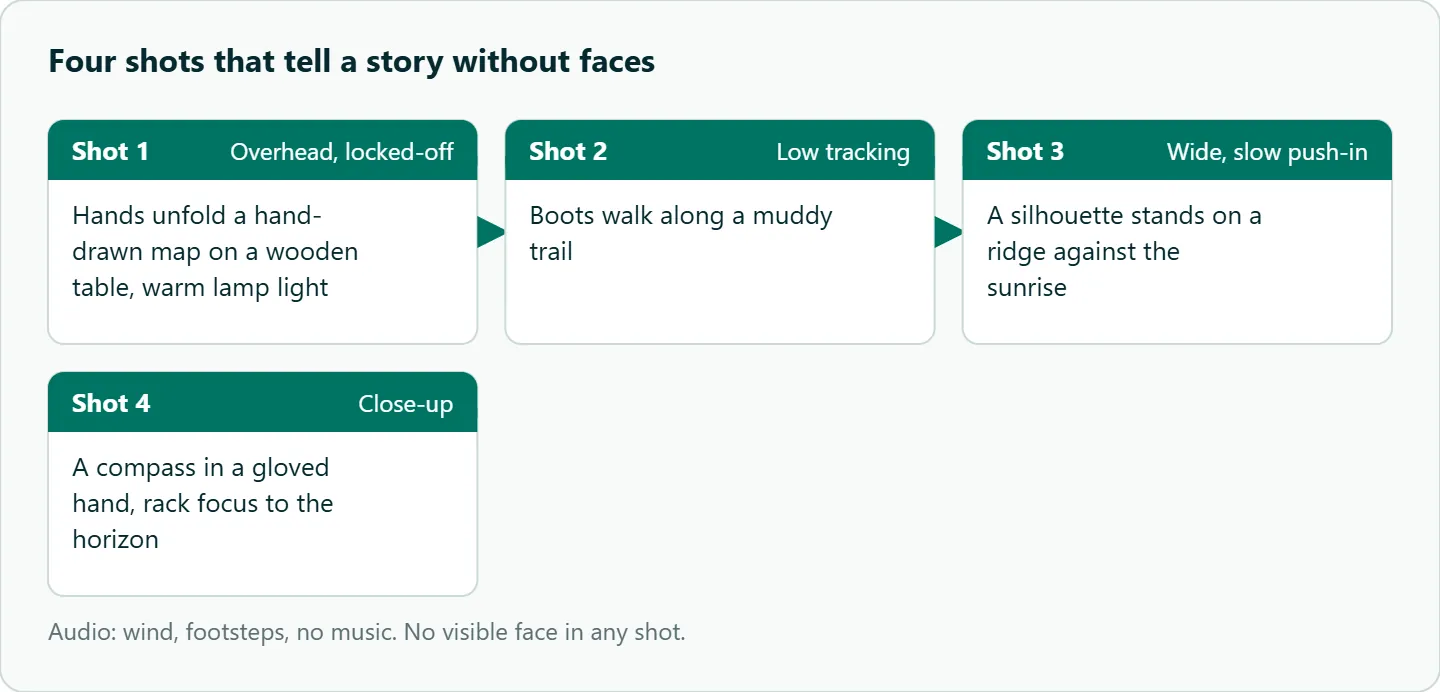
Keep faces out of frame when the story allows it. Hands, silhouettes, over-the-shoulder angles, products and environments avoid the issue entirely and often need fewer re-rolls. The hands-only template in our Seedance UGC ad prompts exists for the same reason. Here is a four-shot sequence with no visible face:
Shot 1: Overhead, locked-off. Hands unfold a hand-drawn map on a wooden table, warm lamp light.
Shot 2: Low tracking shot. Boots walk along a muddy trail.
Shot 3: Wide, slow push-in. A silhouette stands on a ridge against the sunrise.
Shot 4: Close-up. A compass in a gloved hand, rack focus to the horizon.
Audio: wind, footsteps, no music.
Reading the error in code
Before you change the input, confirm the code is content_filtered; any other failure belongs to the checklist linked above. The errors page says to branch on error.code, which is a fixed vocabulary, and not on message, whose wording may change. It also says retrying content_filtered with the same input "gives the same answer," so do not put it in your retry loop.
import os, time, requests

BASE = "https://api.oceantoken.ai/v1"
H = {"Authorization": f"Bearer {os.environ['OCEANTOKEN_API_KEY']}"}

body = {
    "model": "bytedance/seedance-2.5",
    "prompt": "The illustrated character turns and smiles, soft window light",
    "duration": 5,
    "resolution": "480p",
    "frame_images": [{"type": "image_url", "frame_type": "first_frame",
                      "image_url": {"url": "https://example.com/illustrated-character.png"}}],
}
r = requests.post(f"{BASE}/videos", headers=H, json=body)
if r.status_code == 400 and r.json()["error"]["code"] == "content_filtered":
    raise SystemExit("Refused before rendering: change the image or prompt")
r.raise_for_status()
job = r.json()

while job["status"] in ("queued", "in_progress"):
    time.sleep(15)
    job = requests.get(f"{BASE}/videos/{job['id']}", headers=H).json()

if job["status"] == "failed" and job["error"]["code"] == "content_filtered":
    print("Result refused: try generate_audio false, then change the input")
How to test this on your workload
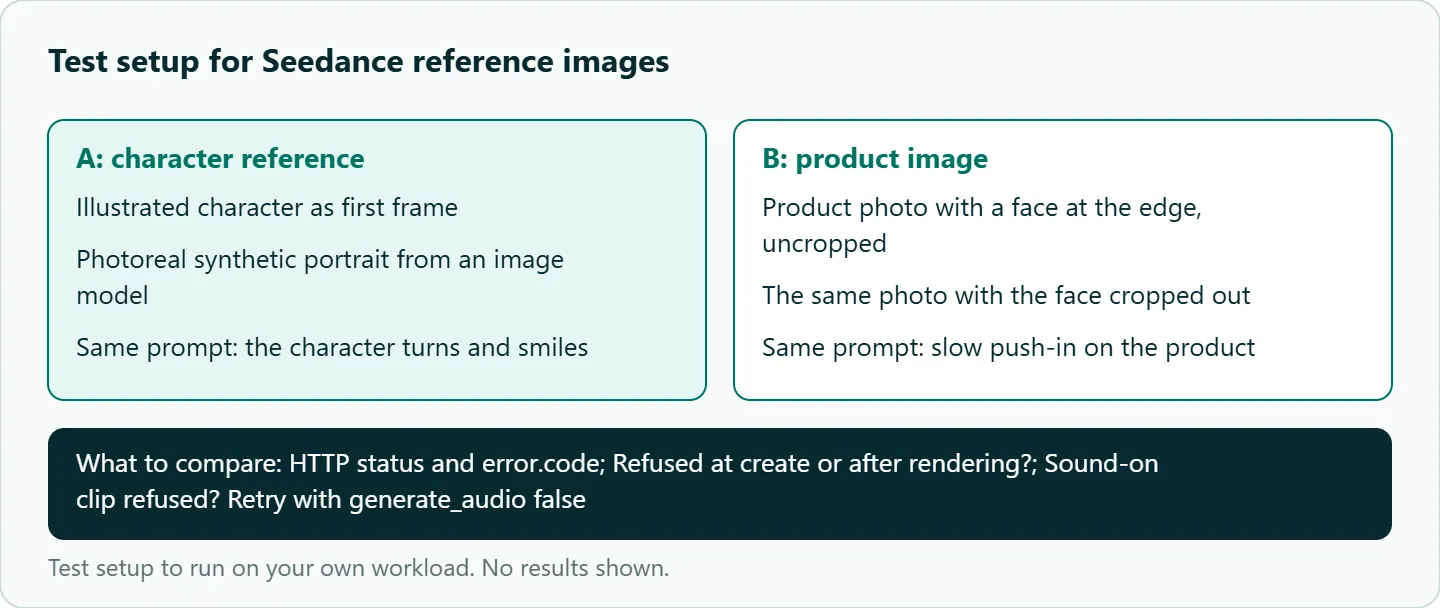
We have not run a rejection test on these inputs, so the table above is a checklist, not measured results. If you want to know where your own assets stand, run a small, honest test. Do not use photos of real people you have no rights to, or named characters.
- Pick one scene and one prompt, such as "The character turns and smiles, soft window light."
- Run it with an illustrated character as the first frame, then with a photoreal synthetic portrait made by an image model.
- Run a product image with a face at the edge, once uncropped and once cropped.
- For each job, log the HTTP status,
error.code, and whether the refusal came at create or after rendering. - Retry any refused sound-on clip with
generate_audio: falseand note whether it passes.
Our take: Filters will keep changing, and no public guide stays current for long. Build on invented, illustrated or consented subjects, treat every refusal as information about your input, and keep a short log of what passes so your team stops re-learning it.
Running it on OceanToken
Seedance 2.5 here is bytedance/seedance-2.5, with bytedance/seedance-2.5-upscaled for 720p and 1080p, both listed on the Seedance 2.5 model page. The base URL is https://api.oceantoken.ai/v1.
Two parts of the API matter for filter work. Safety refusals and failed jobs are not charged, and the hold on your balance is released, so finding out which reference images pass costs you nothing beyond time. And the error body uses the same error object as OpenAI's, with a stable code, so a content_filtered branch is a two-line check. One prepaid balance with no subscription covers the other video models too. New to the API? Start with the Seedance API quickstart in Python. See the current rate on /seedance-api.
FAQ
Can I animate a photo of myself? Expect a real-person photo to be refused. ByteDance offers liveness verification for Seedance 2.0 in its own tooling, but we found no such flow in our docs.
Why was a cartoon rejected? It may resemble a real person or a protected character closely enough to trip the check. Change the design or reframe it.
Will rewording the prompt fix it? For a name or keyword in the prompt, often yes. For an image refusal, change the image; retrying the same input gives the same answer.
Is a refused request billed? No. Our docs say safety refusals and failed jobs are not charged.
Why did a clip with no faces fail? The soundtrack may have been refused. Retry with generate_audio: false.
Sources
- OceanToken: Seedance 2.5 model page (checked 2026-11-08)
- OceanToken docs: Errors (checked 2026-11-08)
- OceanToken docs: Video guide (checked 2026-11-08)
- ComfyUI docs: Seedance 2.0 real human (checked 2026-11-08)
- Runway: Seedance 2.0 prompt guide (checked 2026-11-08)
- TechCrunch: Hollywood isn't happy about the new Seedance 2.0 video generator (checked 2026-11-08)
- Storyboard18: ByteDance to strengthen Seedance 2.0 safeguards (checked 2026-11-08)
- OceanToken Seedance API page (checked 2026-11-08)
Get your OceanToken API key
- Create an OceanToken account and an API key.
- Copy the snippet below, paste your key, and run it.
- Check the current rate on /seedance-api.
curl https://api.oceantoken.ai/v1/videos \
  -H "Authorization: Bearer $OCEANTOKEN_API_KEY" \
  -H "Content-Type: application/json" \
  -d '{"model": "bytedance/seedance-2.5", "prompt": "Overhead, locked-off. Hands unfold a hand-drawn map on a wooden table, warm lamp light.", "duration": 5, "resolution": "480p"}'
More from the blog
Hailuo Video Problems: 10 Fixes by Symptom
Hailuo video problems sorted by symptom: morphing faces, static or frantic motion, ignored camera moves, refused requests. Causes, fixes and a triage table.
Kling Hands and Faces Artifacts: Fixes
Kling hands and faces artifacts in one shot: extra fingers, merged grips, face morphing, teeth. A five-minute frame check and prompt fixes from Kling's guides.
Seedance Generation Failed? Causes and Fixes
Seedance generation failed? Work through policy, settings, input and capacity causes in order, and use a retry pattern that never pays for the same clip twice.