

Wan 3.0 Prime vs Veo 3.1: Image to Video
Wan 3.0 Prime vs Veo 3.1 image to video on one API: first and last frame fields, reference image limits, lengths, shapes and which model fits each shot type.
By OceanToken Team
Editor's note: Most image to video comparisons ask which model looks better. In practice the first question is narrower: can the model take the inputs your shot needs, in the shape you deliver? Wan 3.0 Prime and Veo 3.1 split cleanly on that. One takes more references, more lengths and more shapes; the other has the documented end frame and 4K. Pick by shot, not by brand.
Short answer: For Wan 3.0 Prime vs Veo 3.1 image to video, use Veo 3.1 when the shot must end on a set frame or ship in 4K. Use Wan 3.0 Prime for square or 3:4 product clips, clips longer than 8 seconds, short 2 to 3 second inserts, and shots built from more than three reference images.
OceanToken runs alibaba/wan-3.0-prime and google/veo-3.1 on the same POST /v1/videos call with the same key, and both take image inputs in the same frame_images and input_references fields, so switching between them is a change of model id and of values each model accepts. Facts below come from both models' API references, our video guide, the two model pages and Google's Veo docs, read on November 22, 2026. We have not rendered these comparisons ourselves, so the quality questions end in a test you can run on your own images.
01 · Wan 3.0 Prime vs Veo 3.1 image to video: the inputs side by side
Start with what each model accepts, because a request with a value the model does not take is refused with 400 invalid_request before anything runs or is charged. That makes the table below the real boundary of each model, not a marketing summary.
| Input or option | alibaba/wan-3.0-prime |
google/veo-3.1 |
|---|---|---|
Length (duration) |
2 to 30 s, default 5 | 4, 6 or 8 s, default 6 |
| Resolution | 480p, 720p, 1080p | 720p, 1080p, 4K |
| Aspect ratio | 16:9, 4:3, 1:1, 3:4, 9:16, 21:9 | 16:9, 9:16 |
Follows the image's shape (adaptive) |
Not listed | Not listed |
| First frame | Yes, frame_images |
Yes, frame_images |
| Last frame | Accepted by the reference; model page promises first frame only | Yes, frame_images |
| Reference images | Up to 10 | Up to 3 |
| Sound | generate_audio true or false |
generate_audio true or false |
seed |
Not listed | Listed; may be dropped |
| Result file | content_url, valid 24 hours |
content_url, valid 24 hours |
Three rows decide most shots. Veo 3.1 only makes 16:9 and 9:16, so any square or 3:4 deliverable goes to Wan 3.0 Prime by default. Veo 3.1 is the only one of the two that outputs 4K, so a hero shot for a large screen goes the other way. And length: Wan 3.0 Prime runs from 2 to 30 seconds in one job, while Veo 3.1 tops out at 8 seconds per clip, so a long continuous move is one Wan job or a chain of Veo clips. Our Veo 3.1 extend guide covers the chaining method; we will not repeat it here.
Neither model lists adaptive for aspect ratio. Our video guide describes clips that follow the first frame's shape only for models that list it, so on both of these you set aspect_ratio to match your image yourself. If your source image is 4:5 and you ask Veo for 9:16, expect the model to reframe, and check the edges of the frame in your own test.
02 · Best image to video model for product shots
For product shots, the best image to video model is usually the one that matches your delivery shape and the number of angles you have of the product. That makes Wan 3.0 Prime the default for most catalog and marketplace work and Veo 3.1 the pick for a final hero shot.
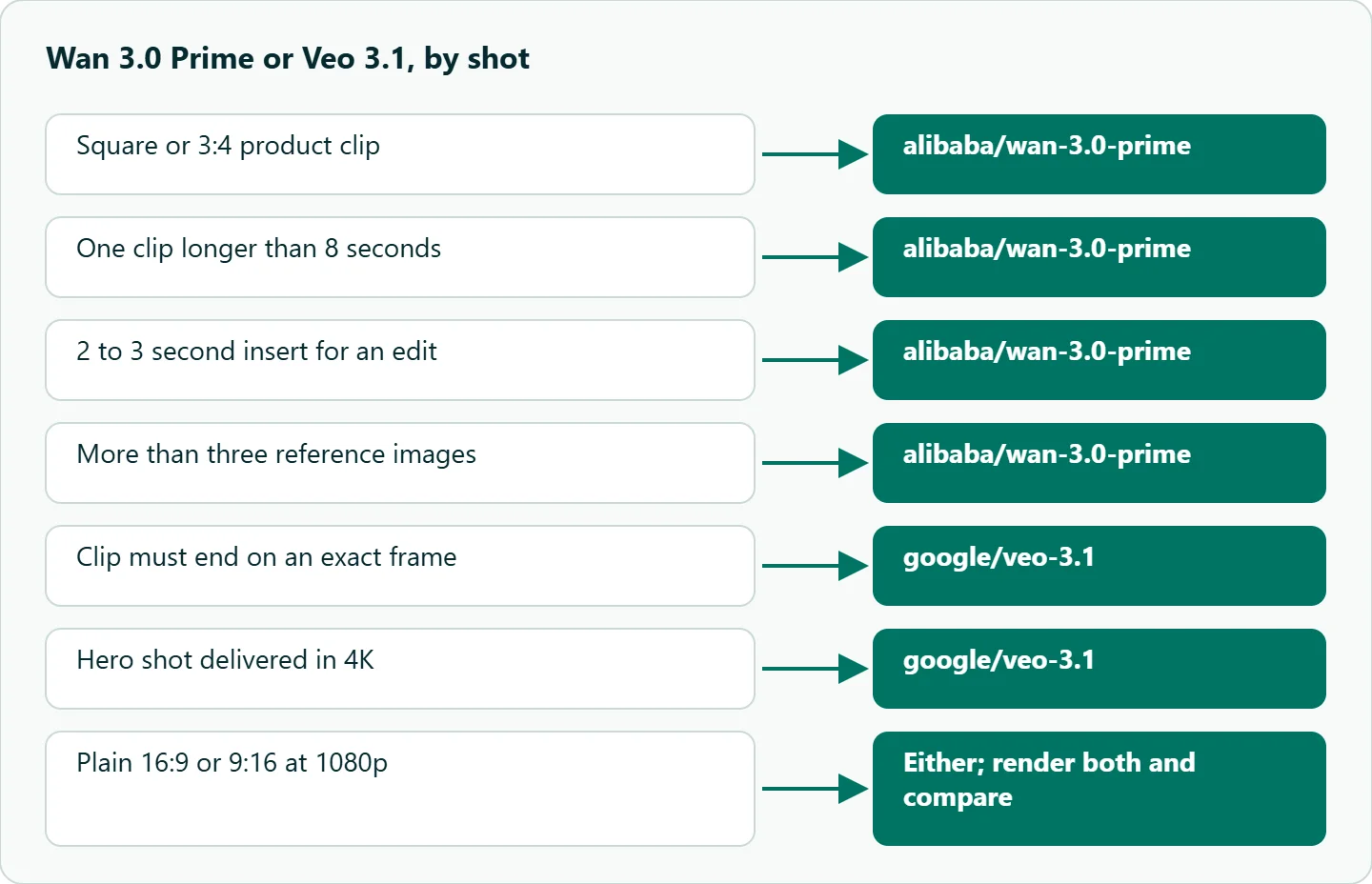
The reasoning runs like this. If your product pages or marketplace feeds use square or 3:4 video, only Wan 3.0 Prime makes those shapes. A product photographed from several angles, plus a label close-up and a packaging shot, is easily more than three images, and Wan 3.0 Prime takes up to ten as references while Veo 3.1 takes three. Turntable and slow orbit clips tend to run longer than 8 seconds when you want a full rotation at a calm speed, and Wan 3.0 Prime can do that in one job.
Veo 3.1 earns the product shot when the clip is a finished cut rather than catalog coverage. Its model page describes it as built for visual fidelity in final production cuts, it is the one with 4K output, and its last frame is backed by both our reference and Google's own docs, so a clip that must settle on an exact packshot is safer there.
| Product shot | Default model id | Why |
|---|---|---|
| Square or 3:4 feed clip | alibaba/wan-3.0-prime |
Veo 3.1 makes only 16:9 and 9:16 |
| Full turntable, 10 to 20 s | alibaba/wan-3.0-prime |
One job up to 30 s; Veo stops at 8 s |
| Product from many angles | alibaba/wan-3.0-prime |
Up to 10 reference images |
| 2 to 3 s insert for an edit | alibaba/wan-3.0-prime |
Shortest length is 2 s; Veo's is 4 s |
| Hero shot for a large screen | google/veo-3.1 |
4K output |
| Clip must end on an exact packshot | google/veo-3.1 |
Documented first and last frame |
| Vertical ad, 9:16, 1080p | Either; test both | Both make it |
The last row is honest: for a plain 9:16 product ad at 1080p, both models accept the request and the difference is quality, which only your own render can show. Put a label close-up into your test set either way, because small text shows lost detail sooner than anything else in a product frame.
If you are still choosing between the two Wan tiers, our Wan 3.0 vs Wan 3.0 Prime comparison covers that; the Wan 3.0 Prime model page describes Prime as a fast-mode variant of Wan 3.0.
03 · First and last frame video API compared
Both models use the same first and last frame video API shape: a frame_images array of at most two entries, each with frame_type set to first_frame or last_frame, and an image as a public https:// URL or a data URL. What differs is how firmly each model's documentation backs the last frame.
| Field or rule | alibaba/wan-3.0-prime |
google/veo-3.1 |
|---|---|---|
frame_images |
Up to 2 entries | Up to 2 entries |
frame_type values |
first_frame, last_frame |
first_frame, last_frame |
| Model page description | Text to video and first-frame image to video | Text and image input |
| Short form | "first_frame": "https://..." |
"first_frame": "https://..." |
| Image size | Up to 25 MB each; keep the request under 10 MB | Same |
| Shape handling | Set aspect_ratio to match the image |
Set aspect_ratio to match the image |
The pitfall is on the Wan side. The model page for Wan 3.0 Prime describes first-frame image to video, and the API reference also accepts a last_frame entry. Neither says what happens to a last frame the model does not use: an end frame the clip lands on, a frame that is ignored, or a refusal. Our Wan 3.0 Prime image to video guide goes through this in detail. The short version is to call the model-spec endpoint first, curl "https://api.oceantoken.ai/oceantoken/video/model-spec?model=alibaba/wan-3.0-prime" -H "Authorization: Bearer $OCEANTOKEN_API_KEY": its modes list shows i2v for first frame and flf2v for first and last frame, and if only i2v comes back, design Wan shots around the opening image and let the prompt steer the ending.
On Veo 3.1 the last frame is on firmer ground. Google's Veo docs describe lastFrame as the final image of an interpolation video and say it must be used with a first image, and our reference lists both frame types. That is why a shot whose ending is fixed by design, such as a product that must settle on a logo-forward packshot or a person who must end in a given pose, goes to Veo by default.
One more difference to plan for: Google's Veo page (which notes its Gemini API preview ids were retired on October 22, 2026) still lists durations of 4, 6 and 8 seconds and 8-second clips for 1080p and 4K on its own API. Our reference for google/veo-3.1 does not list that rule. If you plan 6-second Veo clips at 1080p, send one test job before you build around it.
04 · Reference images in image to video
Reference images in image to video do a different job from frames. A frame fixes a moment of the clip; references tell the model what a subject or product looks like, and the model builds the clip from them. Wan 3.0 Prime takes up to ten reference images in input_references, and Veo 3.1 takes up to three.
| Question | alibaba/wan-3.0-prime |
google/veo-3.1 |
|---|---|---|
| Most reference images | 10 | 3 |
| Field | input_references, type: image_url |
input_references, type: image_url |
| What Google's docs say | Not applicable | Up to three images of a person, character or product; 8 s clips |
| Frames and references together | Not stated; test it | Not stated; test it |
Three references are enough for most single-subject shots: a front view, a three-quarter view and a detail. That covers a person in one outfit or a product with one label. Ten references matter when the subject has more to hold on to, such as a product line where the clip shows several items, a garment with a back print and a front print, or a character with a distinctive prop. With Veo you choose the three images that carry the most identity and drop the rest.
Our video guide states that on Seedance a request carries frames or references, not both, and says nothing either way for these two models. Before a pipeline relies on a first frame plus references in one request, send that request once. A refusal comes back as 400 invalid_request and costs nothing, and the fallback is simple: keep the first frame, drop the references, and repeat the subject description word for word in the prompt.
Google's docs add one rule that our reference for google/veo-3.1 does not list: reference images require 8-second clips on Google's API. If your plan uses references on 4 or 6 second Veo clips, test that request too.
05 · People shots and camera-move shots
For a person, the inputs table favors Veo 3.1 in one specific case: when the clip must end in a set pose or expression, because its last frame is documented. For a talking-head or lifestyle clip that only needs a good opening image and natural motion, both models qualify and the decision is quality.
Real faces add a second filter. The Veo 3.1 model page says OceanToken does not block photos of real people as references, but that Veo follows its maker's own content rules, which can refuse some images or prompts, and that a refused job is not charged. The Wan 3.0 Prime model page has its own FAQ entry on real people; read both before you plan a campaign around a real face, and only use photos you have the right to use.
Camera moves split by length and by ending. A slow dolly or orbit that runs longer than 8 seconds is one Wan 3.0 Prime job. A move that must arrive at a specific frame, like a push-in that stops exactly on a logo, is a Veo 3.1 job with a first and last frame. A 2-second whip or reveal for an edit fits only Wan, since Veo's shortest clip is 4 seconds.
| Shot | Default model id | Condition that flips it |
|---|---|---|
| Person, opening image only | Either; test both | Real face refused on one model |
| Person must end in a set pose | google/veo-3.1 |
Wan's modes lists flf2v and your test holds |
| Dolly or orbit over 8 s | alibaba/wan-3.0-prime |
You need 4K, then chain Veo clips |
| Push-in that stops on a logo | google/veo-3.1 |
Square delivery, then Wan |
| 2 s reveal or whip for an edit | alibaba/wan-3.0-prime |
None; Veo starts at 4 s |
06 · One request, two model ids
Because both models share the endpoint and the field names, the same request body works on either as long as every value is in that model's options. The safe common ground is 720p or 1080p, 16:9 or 9:16, and a duration of 4, 6 or 8 seconds. This script sends one first-frame request to both models with an Idempotency-Key, so a retry after a network timeout returns the job already created instead of starting a second one:
import os, time, uuid, requests

BASE = "https://api.oceantoken.ai/v1"
H = {"Authorization": f"Bearer {os.environ['OCEANTOKEN_API_KEY']}"}
IMAGE = "https://example.com/bottle-front.png"
RUN = uuid.uuid4().hex                      # one key per run, reused only by retries

def make(model):
    body = {
        "model": model,
        "prompt": "Slow push in on the bottle, soft light from the left, end with the camera still",
        "duration": 6,
        "resolution": "720p",
        "aspect_ratio": "16:9",
        "generate_audio": False,
        "frame_images": [{"type": "image_url", "frame_type": "first_frame",
                          "image_url": {"url": IMAGE}}],
    }
    r = requests.post(f"{BASE}/videos", json=body, timeout=60,
                      headers={**H, "Idempotency-Key": f"bottle-{model}-{RUN}"})
    r.raise_for_status()
    print(model, "dropped:", r.headers.get("x-oceantoken-dropped-params"))
    return r.json()["id"]

def wait(video_id):
    while True:
        job = requests.get(f"{BASE}/videos/{video_id}", headers=H, timeout=60).json()
        if job["status"] not in ("queued", "in_progress"):
            return job
        time.sleep(15)

for model in ("alibaba/wan-3.0-prime", "google/veo-3.1"):
    job = wait(make(model))
    print(model, job["status"], job.get("error"))
    if job["status"] == "completed":
        mp4 = requests.get(f"{BASE}/videos/{job['id']}/content", headers=H, timeout=300)
        open(f"{model.split('/')[1]}.mp4", "wb").write(mp4.content)
The print of x-oceantoken-dropped-params is there on purpose. Our video guide says optional fields that cannot be applied to a request are left out rather than refused, and that header names them. It is the quickest way to see whether a field you care about, such as seed, if you add it to the Veo request, actually reached the model.
To use a model-specific option, branch on the model id. A 1:1 clip or a 12-second clip goes only to Wan; "resolution": "4K" goes only to Veo. Sending either to the other model gets a 400 that names the accepted values, which is a cheap way to find out but a poor way to run production.
07 · Pitfalls when moving a shot between the two
| Situation | What happens | What to do |
|---|---|---|
"aspect_ratio": "1:1" on Veo 3.1 |
Refused with 400, nothing charged | Use Wan 3.0 Prime, or crop a 16:9 clip |
"duration": 12 on Veo 3.1 |
Refused; only 4, 6, 8 | Wan 3.0 Prime, or chain Veo clips |
"resolution": "4K" on Wan 3.0 Prime |
Refused; top is 1080p | Use Veo 3.1 |
"duration": 2 on Veo 3.1 |
Refused; shortest is 4 | Wan 3.0 Prime, or trim in the edit |
| Four or more references on Veo 3.1 | Refused; limit is 3 | Keep the three that carry identity |
last_frame on Wan 3.0 Prime |
Accepted by the reference; effect not documented | Check modes for flf2v, then test |
Portrait image with aspect_ratio 16:9 |
Neither model follows the image's shape | Match aspect_ratio to the image |
| Downloading the next day | content_url expires after 24 hours |
Download as soon as the job completes |
How to test this on your workload
We have not run these comparisons for this article. This setup tells you which model holds your subject better, using images you actually ship:
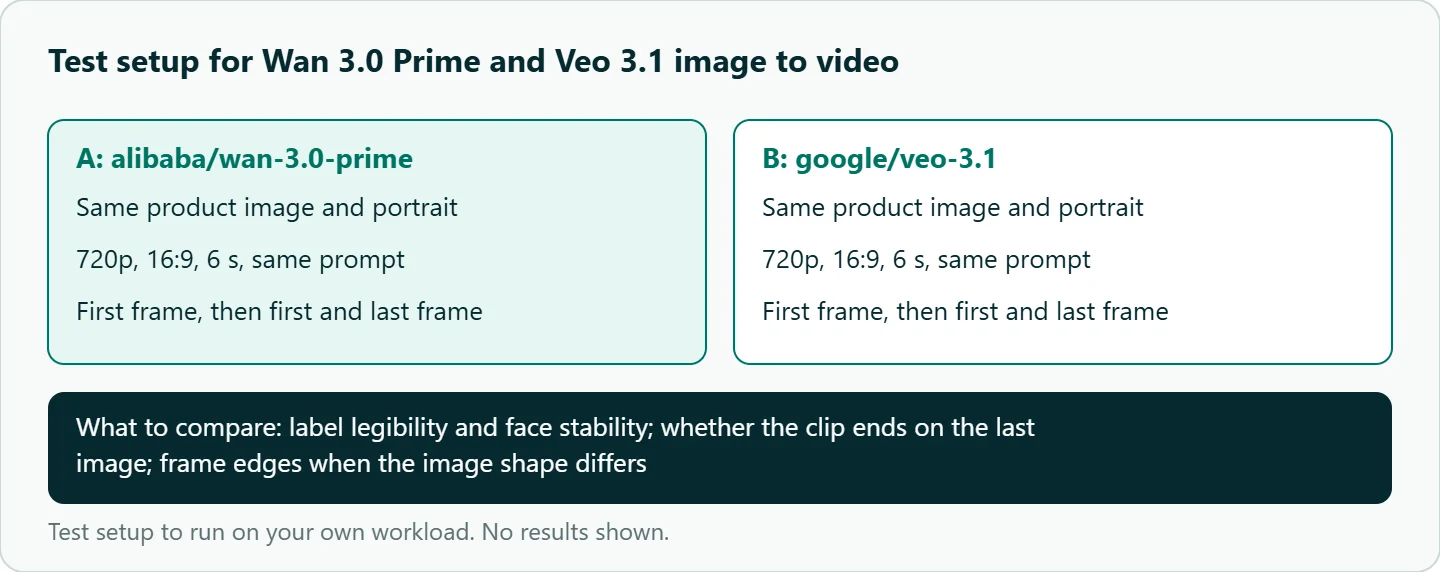
- Pick one product image with a readable label and one portrait you have the rights to use.
- Call the model-spec endpoint for both ids (
GET https://api.oceantoken.ai/oceantoken/video/model-spec?model=<id>with your key) and note whethermodeslistsflf2v. - Render each image on both models at 720p, 16:9, 6 seconds, first frame only, same prompt.
- Render the product again with a first and last frame on both models, and check whether each clip ends on the last image.
- Send one Veo request with three references and a first frame, and one with references at 4 seconds; note whether each is accepted.
- Compare label legibility, face stability, motion speed and the frame edges.
- Check each job's charge in the console's Logs and divide by the seconds you kept.
For drafts before a final Veo render, our Veo 3.1 Fast vs Standard comparison covers when the faster tier is enough.
| What you see | Do this |
|---|---|
| Wan holds the label and the shape you deliver | Wan 3.0 Prime for catalog clips |
| Only Veo lands on the last frame | Veo 3.1 for shots with a fixed ending |
| Both hold the subject at 9:16 | Choose on motion quality and rate |
| References plus frames refused | First frame plus a repeated description |
Our take: Route by shot. Square, 3:4, long, very short or reference-heavy shots go to alibaba/wan-3.0-prime. Shots that must end on an exact frame or ship in 4K go to google/veo-3.1. For a plain 16:9 or 9:16 clip that both accept, render once on each and let your own footage decide.
Running it on OceanToken
Both models run at the OpenAI-compatible base URL https://api.oceantoken.ai/v1 on POST /v1/videos, and the video guide says code that already sends frame_images and input_references carries over with only the base URL, key and model id changed. One key and one prepaid balance, with no subscription, cover alibaba/wan-3.0-prime, google/veo-3.1 and the image models you might use to make first frames, so routing a shot to the other model is a change of model id rather than a second account and a second integration.
A value a model does not take is refused before anything runs or is charged, a failed or refused video job is not charged and its hold goes back to your balance, and an Idempotency-Key keeps a retried request from running twice. Both models are priced per second of video; see the current rate on /wan-api and /veo-api, or on the Wan 3.0 Prime and Veo 3.1 model pages.
FAQ
Which is better for image to video, Wan 3.0 Prime or Veo 3.1? Veo 3.1 for a shot that must end on a fixed frame or ship in 4K; Wan 3.0 Prime for square or 3:4, longer than 8 seconds, or more than three references.
Do both models support a first and last frame? Veo 3.1 does, in our reference and in Google's docs. Wan 3.0 Prime's reference accepts a last frame but its model page promises only a first frame, so check modes and test.
How many reference images can I send? Up to 10 on Wan 3.0 Prime and up to 3 on Veo 3.1, in input_references.
Can I use the same request for both models? Yes, if every value is in both models' options: 720p or 1080p, 16:9 or 9:16, and 4, 6 or 8 seconds. Change only model.
Which one makes 4K? Only Veo 3.1. Wan 3.0 Prime tops out at 1080p.
Sources
- OceanToken docs: Wan 3.0 Prime spec (JSON) (checked 2026-11-22)
- OceanToken docs: Veo 3.1 spec (JSON) (checked 2026-11-22)
- OceanToken docs: Video guide (checked 2026-11-22)
- OceanToken: Wan 3.0 Prime model page (checked 2026-11-22)
- OceanToken: Veo 3.1 model page (checked 2026-11-22)
- Google AI Studio: Generate videos with Veo (checked 2026-11-22)
Get your OceanToken API key
- Create an OceanToken account and an API key.
- Copy the snippet below, paste your key, and run it.
- Check the current rate on /wan-api.
curl https://api.oceantoken.ai/v1/videos \
  -H "Authorization: Bearer $OCEANTOKEN_API_KEY" \
  -H "Content-Type: application/json" \
  -d '{"model": "alibaba/wan-3.0-prime", "prompt": "Slow push in on the bottle, soft light from the left, end with the camera still", "duration": 6, "resolution": "720p", "aspect_ratio": "16:9", "frame_images": [{"type": "image_url", "frame_type": "first_frame", "image_url": {"url": "https://example.com/bottle-front.png"}}]}'
More from the blog
Qwen3.8 Max vs GLM 5.3 vs DeepSeek V4 Pro
Qwen3.8 Max vs GLM 5.3 vs DeepSeek V4 Pro by job: coding agents, tool calling and JSON, long context, and how each handles thinking and reasoning_content.
GTE-Large vs BGE-M3 for Multilingual RAG
GTE-Large vs BGE-M3 for RAG: English-only and 512 tokens vs 100+ languages and 8K input, what /v1/embeddings returns, and how chunking changes.
Kimi K3 vs Kimi K3.1 Pro: Which to Use
Kimi K3 vs Kimi K3.1 Pro by job: which takes tools, JSON and video on our API, how thinking and reasoning_content work, and what to change when you migrate.