

Seedance vs Veo 3.1 for Dialogue Scenes
Seedance vs Veo 3.1 for dialogue: which model fits a single line, a two-person exchange, talk past 8 seconds, non-English lines or a voice from reference audio.
By OceanToken Team
Editor's note: Most comparisons ask which model "does dialogue better" and then argue about lip sync. In API work the deciding facts are plainer: how many seconds one request can hold, whether you can hand the model a voice, and how many people are talking. On this endpoint Veo 3.1 fits a short line and Seedance fits a conversation. Pick by the scene, and mixing both in one edit is normal.
Short answer: For Seedance vs Veo 3.1 for dialogue, use google/veo-3.1 when one person says one English line that fits in 8 seconds. Use bytedance/seedance-2.5 for back-and-forth between speakers, talk longer than 8 seconds, or a voice taken from a reference recording; bytedance/seedance-2.0 covers the same up to 15 seconds.
On OceanToken both families sit behind one API key and the same POST /v1/videos call, so this is a comparison of what each model accepts, not of two integrations. Moving a scene from Veo to Seedance is a change of model id plus any values the new model does not take.
Everything below comes from the API reference for each id and from the publishers' own pages, read on November 20, 2026. We have not run a side-by-side for this article, so the quality questions end in a test you can run yourself.
01 · What each model accepts for a dialogue shot
Dialogue puts pressure on four fields: duration, generate_audio, the reference inputs, and whatever lets you continue a clip. Here is how the three ids compare on those fields in the OceanToken API reference.
| Detail | google/veo-3.1 |
bytedance/seedance-2.0 |
bytedance/seedance-2.5 |
|---|---|---|---|
| Length per request | 4, 6 or 8 s (default 6) | 4 to 15 s (default 5) | 4 to 30 s (default 5) |
| Resolution | 720p, 1080p, 4K | 480p, 720p, 1080p, 4K | 480p, 720p, 1080p |
| Aspect ratio | 16:9, 9:16 | Seven options incl. adaptive |
Seven options incl. adaptive |
Sound (generate_audio) |
Yes | Yes | Yes |
| First and last frame | Yes | Yes | Yes |
| Reference images | Up to 3 | Up to 9 | Up to 30 |
| Reference video | No | Up to 3 | Up to 10 |
| Reference audio | No | Up to 3 | Up to 10 |
return_last_frame |
Not listed | Yes | Yes |
Continue a clip (omni_reference_task_type: extend) |
Not listed | Yes | Yes |
Two rows decide most dialogue jobs. Length per request tells you whether a whole exchange fits in one clip or has to be cut. Reference audio tells you whether you can choose the voice, or must accept the one the model invents from your prompt.
Veo 3.1 has neither a long clip nor an audio input on this endpoint, which is why it ends up on short, single-speaker lines. Resolution matters less for this question, and we keep that comparison in a separate piece: Seedance Upscaled vs 2.5 vs Veo 3.1 for 1080p.
02 · Seedance vs Veo 3.1 for dialogue, scene by scene
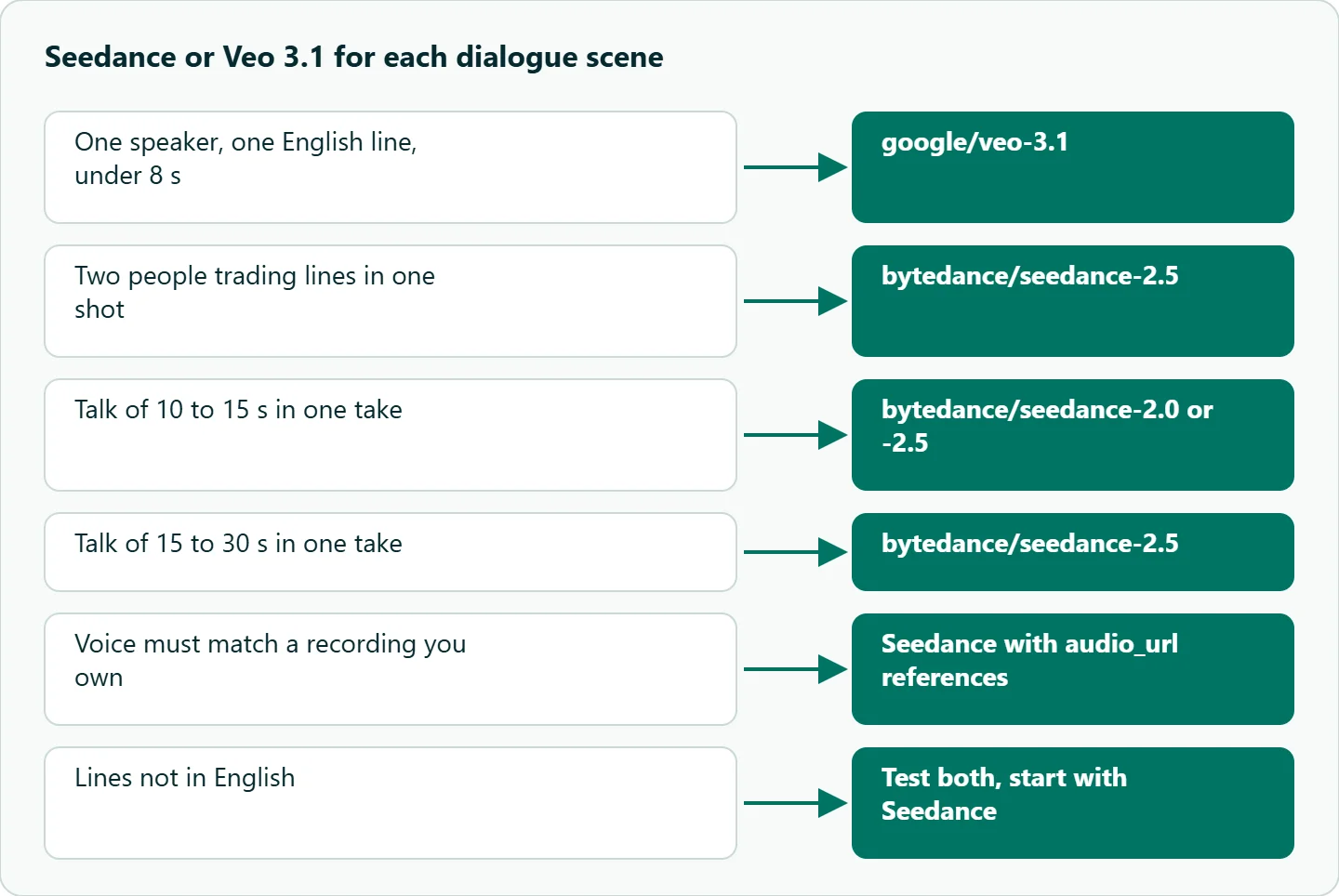
Here is the routing we would hand to a team. The limits come from section 01; the choices are our judgement, and the reasoning follows the table.
| Dialogue scene | Default model id | Why |
|---|---|---|
| One speaker, one English line, under 8 s | google/veo-3.1 |
The whole line fits in one request, and Google documents English speech fully |
| Two people trading lines in one shot | bytedance/seedance-2.5 |
Room for both turns in one clip, and ByteDance says it keeps several characters' voices |
| A monologue of 10 to 15 s | bytedance/seedance-2.0 or -2.5 |
One request instead of two Veo clips and a cut |
| An exchange of 15 to 30 s | bytedance/seedance-2.5 |
The only id here that goes past 15 s in one request |
| The voice must match a recording you own | bytedance/seedance-2.5 or -2.0 |
Only Seedance takes audio_url references |
| Lines not in English | Test both; start with Seedance | Google says other languages have not been evaluated for Veo |
| Hero close-up delivered in 4K | google/veo-3.1 |
A single line that needs 4K: Veo 3.1 and Seedance 2.0 both list 4K; Veo keeps it on the same id you use for short lines |
The single-line case goes to Veo because nothing about it needs Seedance's extra inputs, and Google's documentation gives explicit rules for writing speech for Veo (quotes for the line, sound described in the prompt). The two-speaker case goes to Seedance for a structural reason, not a quality one.
Two people need two turns plus a beat between them, and that rarely fits in 8 seconds without rushing. Seedance 2.5 gives you up to 30 seconds, and ByteDance's launch post says it can keep "the appearances and voices of multiple characters" in one scene.
When does this not hold? If your exchange is two short lines, say four seconds each, Veo can carry them as two separate clips cut together, one per speaker. That is a normal shot-reverse-shot edit, and it can look more deliberate than a single wide shot.
03 · AI video with lip sync API: turning on sound and placing the line
Both models make the voice, the lip movement and the ambience in the same request when you send "generate_audio": true, and both read the spoken line from your prompt. There is no separate lip sync endpoint and no audio track to attach afterwards. What changes between them is how you write the line and what you can add around it.
Google's Veo documentation gives one direct rule: put spoken words in quotes. Its prompt guidance also asks you to describe sound effects and ambient noise explicitly, so a line usually reads as a short stage direction: who speaks, how, and what the room sounds like.
Seedance reads the same kind of prompt. Its extra lever is the reference list, covered in section 05. Here is one request; to move it to the other model, change model and keep duration inside the new model's range.
curl https://api.oceantoken.ai/v1/videos \
  -H "Authorization: Bearer $OCEANTOKEN_API_KEY" \
  -H "Content-Type: application/json" \
  -H "Idempotency-Key: anchor-line-001" \
  -d '{
    "model": "google/veo-3.1",
    "prompt": "Medium close-up, locked-off camera. A news anchor in her forties looks into the lens and says: \"The vote has been moved to Friday.\" Quiet studio hum, no music.",
    "duration": 8,
    "resolution": "720p",
    "aspect_ratio": "16:9",
    "generate_audio": true
  }'
For Seedance the same body works with "model": "bytedance/seedance-2.5", and you can widen aspect_ratio to the formats Veo lacks, such as 1:1. Keep the speech in quotes there too. Google recommends quotes for speech, and keeping the same format means the prompt moves between models unchanged. For deeper prompt patterns, see our guides to Veo 3.1 native audio dialogue prompts and Seedance lip sync and dialogue prompting.
A practical point on length: a line has to fit in the clip with room to breathe. As a rough guide, read the line aloud at the pace you want and time it. If it takes six seconds, ask for eight, because a clip that ends mid-word is a retake.
04 · Veo 3.1 dialogue longer than 8 seconds
One Veo 3.1 request on OceanToken makes at most 8 seconds, so dialogue longer than that has to be split into several clips or moved to Seedance. The API reference for google/veo-3.1 lists only 4, 6 and 8 for duration, and any other value is refused with 400 invalid_request before anything runs or is charged.
Google's own API has a video extension feature for Veo 3.1. Its docs describe adding 7 seconds per extension, up to 20 times. The OceanToken reference for google/veo-3.1 lists no reference video input and no extend option, so on this endpoint you build a longer scene the older way.
Render clip one, take its last frame, and send that frame as first_frame of clip two with the next line in the prompt. Veo does not list return_last_frame, so you pull that frame out of the MP4 yourself, for example with ffmpeg. Nothing carries the voice from one Veo clip to the next except your prompt, so describe the speaker the same way each time and check the voice across the cut.
Seedance makes the same job shorter. On both Seedance ids return_last_frame hands you the end frame with the finished job, and "omni_reference_task_type": "extend" continues a reference video from where it ends. Better still, Seedance 2.5 may not need a second clip at all, since a 25-second exchange fits in one request.
| Dialogue length | Plan on Veo 3.1 | Plan on Seedance |
|---|---|---|
| Up to 8 s | One clip | One clip |
| 8 to 15 s | Two clips, cut on a speaker change | One clip on 2.0 or 2.5 |
| 15 to 30 s | Three or four clips | One clip on 2.5 |
| Over 30 s | Many clips plus an edit | 2.5 plus extend, or cut on speaker changes |
One planning note for Veo: Google's docs say 1080p and 4K need 8-second clips on its API. The API reference on our endpoint does not list that restriction, so send one 6 s job at 1080p and check whether it is accepted before you plan shorter segments at that resolution. Either way, it pays to cut a long exchange where the speaker changes, not mid-sentence: a cut on a new face hides any jump in room tone.
05 · Seedance reference audio for voices
Seedance takes voice references as audio_url entries in input_references: up to 3 on bytedance/seedance-2.0 and up to 10 on bytedance/seedance-2.5. Veo 3.1 takes reference images only, up to 3, so on Veo the voice comes from your prompt description alone. ByteDance's Seedance 2.0 page lists audio among the references the model accepts; it does not spell out what an audio reference controls. That is why the test in the next section includes a voice check.
curl https://api.oceantoken.ai/v1/videos \
  -H "Authorization: Bearer $OCEANTOKEN_API_KEY" \
  -H "Content-Type: application/json" \
  -d '{
    "model": "bytedance/seedance-2.5",
    "prompt": "Two friends at a cafe table. The woman from image 1 speaks in the voice from audio 1: \"You said six, it is half past.\" The man from image 2 laughs and answers in the voice from audio 2: \"Traffic. I brought cake.\" Cafe chatter, no music.",
    "duration": 10,
    "resolution": "720p",
    "generate_audio": true,
    "input_references": [
      {"type": "image_url", "image_url": {"url": "https://example.com/woman.png"}},
      {"type": "image_url", "image_url": {"url": "https://example.com/man.png"}},
      {"type": "audio_url", "audio_url": {"url": "https://example.com/voice-woman.mp3"}},
      {"type": "audio_url", "audio_url": {"url": "https://example.com/voice-man.mp3"}}
    ]
  }'
Three rules from the docs shape this request. First, on Seedance a request carries frames or references, not both; sending a first_frame together with input_references is refused with 400. If you need a fixed look and a fixed voice, put the look in as a reference image, as above, not as a first frame.
Second, on the 2.0 -upscaled ids a reference audio clip needs a reference image or video next to it. Third, every media file is a public URL or data URL of up to 25 MB, and a URL the model cannot fetch fails the job with invalid_request. Only use voices you have the right to use, with the speaker's consent.
06 · Pitfalls when you move a dialogue scene between models
| Situation | What happens | What to do |
|---|---|---|
Seedance request with "duration": 12 moved to Veo |
400 invalid_request; Veo takes 4, 6 or 8 |
Split the line into two clips, or keep it on Seedance |
audio_url reference sent to Veo 3.1 |
Veo lists images only, and a reference the model cannot use is refused with 400 | Describe the voice in the prompt, or move the scene to Seedance |
| First frame plus voice reference on Seedance | Refused with 400: frames or references, not both | Use a reference image for the look |
"aspect_ratio": "1:1" moved to Veo |
Veo lists 16:9 and 9:16 only | Pick one of those two |
| Non-English line on Veo | Google says other languages have not been evaluated | Run the test below before you commit |
| Optional field the request cannot use | The clip is made without it | Read the x-oceantoken-dropped-params response header |
To read any id's options before you send a job, call the model-spec endpoint:
curl "https://api.oceantoken.ai/oceantoken/video/model-spec?model=google/veo-3.1" \
  -H "Authorization: Bearer $OCEANTOKEN_API_KEY"
It returns durations, resolutions, aspect ratios, whether the model makes sound, its modes and its reference limits.
How to test this on your workload
We have not compared the two models' dialogue output for this article, and we do not lean on third-party rankings for a question this specific to your script. This setup answers it with your own lines:
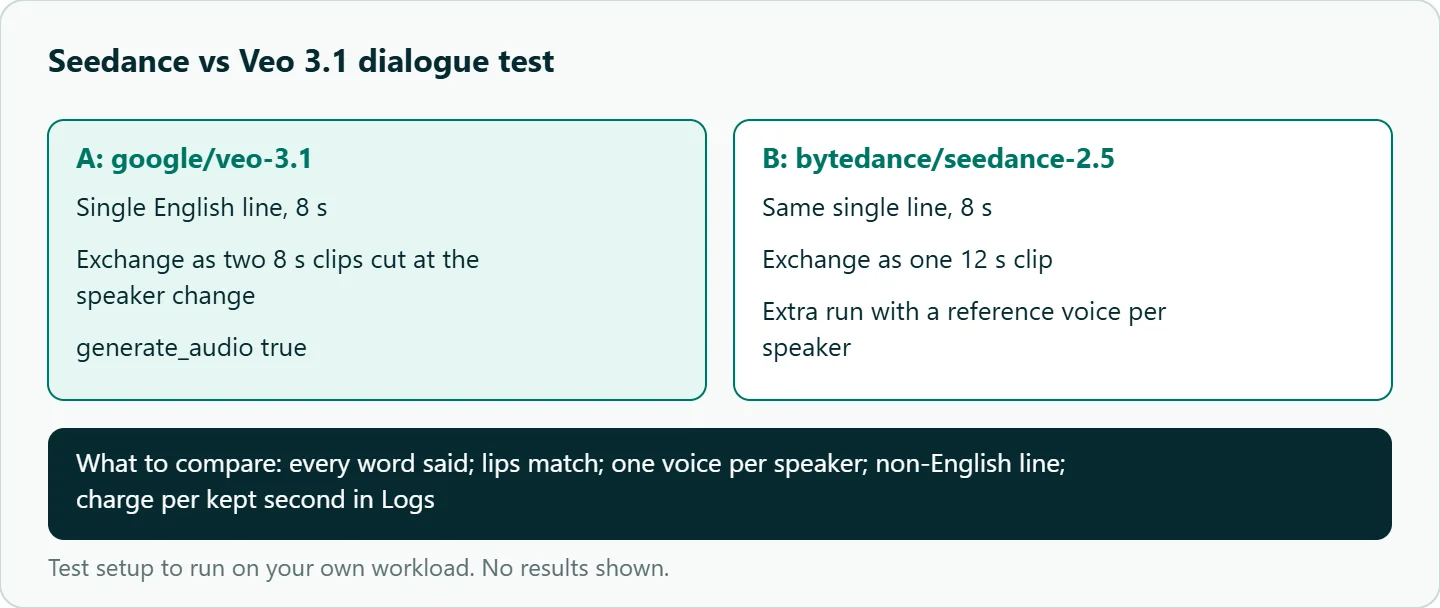
- Write one two-person exchange of about 12 seconds, and one single English line of about 6 seconds.
- Render the single line on
google/veo-3.1at 8 s and onbytedance/seedance-2.5at 8 s, same prompt,generate_audiotrue. - Render the exchange on
bytedance/seedance-2.5as one 12 s clip, and on Veo as two 8 s clips cut at the speaker change. - Watch with sound at the size your audience will see. Check that every word is said, that lips match, and that each speaker keeps one voice.
- If you work in another language, repeat step 2 with a line in that language.
- Add one Seedance run with a reference voice for each speaker and compare it with the voice the model chose itself.
- If you deliver Veo clips at 1080p, send one 6 s
google/veo-3.1job at 1080p and check whether it is accepted before you plan segments shorter than 8 s. - Check each job's charge in the console's Logs and divide by the seconds you kept.
| Your scene | Use |
|---|---|
| One English line, one face | google/veo-3.1 |
| Two or more speakers | bytedance/seedance-2.5 |
| Talk longer than 8 s in one take | bytedance/seedance-2.5, or -2.0 up to 15 s |
| A voice you must match | Seedance with audio_url references |
| Non-English lines | Whichever passes step 5 |
Our take: Make Veo 3.1 the default for one person saying one English line, because nothing in that shot needs more than eight seconds or an audio input. Make Seedance 2.5 the default for everything else in a dialogue scene: two speakers, long takes, and any voice you have to match. Then cut the two together. A Veo close-up for the key line inside a Seedance conversation is a sensible edit, not a compromise.
Running it on OceanToken
Veo 3.1 and both Seedance ids run at the OpenAI-compatible base URL https://api.oceantoken.ai/v1 through POST /v1/videos, and the OpenAI SDK's video methods work with only the base URL and key changed. One key and one prepaid balance, with no subscription, cover both publishers, so the routing table above is a change of model in your config rather than a second account and a second SDK.
A value a model does not take is refused before anything runs or is charged, a failed job is not charged and its hold goes back to your balance, and an Idempotency-Key stops a retry from starting a second job. Veo 3.1 is billed per second of video and Seedance per million video tokens, and what a clip costs depends on its length, resolution and sound; see the current rate on /veo-api and /seedance-api.
FAQ
Can Veo 3.1 make a dialogue clip longer than 8 seconds? Not in one request on this endpoint: google/veo-3.1 takes 4, 6 or 8 seconds. Longer dialogue means several clips chained by their frames, or a move to Seedance.
Which model takes a reference voice? Seedance. bytedance/seedance-2.0 takes up to 3 audio references and bytedance/seedance-2.5 up to 10; Veo 3.1 takes reference images only.
Do I need a separate lip sync step? No. With generate_audio set to true, both models make the speech and the matching mouth movement in the same job.
Which is better for lines in Spanish or Chinese? Google says only English is fully evaluated for Veo, and the ByteDance pages we read make no language claim for Seedance, so run the same line on both before you decide.
How should I write the spoken line? In quotes inside the prompt, with the speaker and the room sound described, as Google's Veo guidance recommends; the same format works for Seedance.
Sources
- OceanToken docs: Veo 3.1 spec (JSON) (checked 2026-11-20)
- OceanToken docs: Seedance 2.0 spec (JSON) (checked 2026-11-20)
- OceanToken docs: Seedance 2.5 spec (JSON) (checked 2026-11-20)
- OceanToken docs: Video guide (checked 2026-11-20)
- Google: Generate videos with Veo 3.1 in the Gemini API (checked 2026-11-20)
- ByteDance Seed: Introducing Seedance 2.5 (checked 2026-11-20)
- ByteDance Seed: Seedance 2.0 (checked 2026-11-20)
- OceanToken: Veo 3.1 model page (checked 2026-11-20)
Get your OceanToken API key
- Create an OceanToken account and an API key.
- Copy the snippet below, paste your key, and run it.
- Check the current rate on /veo-api.
curl https://api.oceantoken.ai/v1/videos \
  -H "Authorization: Bearer $OCEANTOKEN_API_KEY" \
  -H "Content-Type: application/json" \
  -d '{"model": "google/veo-3.1", "prompt": "Medium close-up. A chef looks up and says: \"Service in five minutes.\" Kitchen clatter.", "duration": 8, "resolution": "720p", "generate_audio": true}'
More from the blog
Qwen3.8 Max vs GLM 5.3 vs DeepSeek V4 Pro
Qwen3.8 Max vs GLM 5.3 vs DeepSeek V4 Pro by job: coding agents, tool calling and JSON, long context, and how each handles thinking and reasoning_content.
Wan 3.0 Prime vs Veo 3.1: Image to Video
Wan 3.0 Prime vs Veo 3.1 image to video on one API: first and last frame fields, reference image limits, lengths, shapes and which model fits each shot type.
GTE-Large vs BGE-M3 for Multilingual RAG
GTE-Large vs BGE-M3 for RAG: English-only and 512 tokens vs 100+ languages and 8K input, what /v1/embeddings returns, and how chunking changes.