

Seedance vs Veo 3.1 for 1080p, by Shot
Seedance vs Veo 3.1 for 1080p: when Seedance 2.0 Upscaled is enough, when to render native on Seedance 2.5 or Veo 3.1, and the model ids for each shot.
By OceanToken Team
Editor's note: "Which video API gives the best 1080p per dollar" sounds like one question, but it hides three different jobs: enlarging a cheap render, rendering native on Seedance 2.5, and rendering native on Veo 3.1. Each wins on different shots. We would rather hand you a shot list than a single winner, because the wrong path fails in ways that are easy to predict.
Short answer: For Seedance vs Veo 3.1 for 1080p, pick by shot. Faces, single subjects and landscapes: Seedance 2.0 Upscaled at 1080p. Readable signs, crowds and long multi-shot or reference-heavy scenes: native Seedance 2.5. A single English dialogue take of up to 8 seconds: native Veo 3.1. Draft everything at lower resolution first.
01 · Seedance vs Veo 3.1 for 1080p: three paths side by side
All three run on the same create, poll and download calls. What differs is how the 1080p frame gets made and what a single call can contain. These limits come from each model's API reference, checked on November 13, 2026.
| Seedance 2.0 Upscaled | Seedance 2.5 (native) | Veo 3.1 (native) | |
|---|---|---|---|
| Model id | bytedance/seedance-2.0-upscaled |
bytedance/seedance-2.5 |
google/veo-3.1 |
| How 1080p is made | Low-resolution render, then AI upscale | Rendered at the requested size | Rendered at the requested size |
| Resolutions | 720p, 1080p (4K is a separate -4k id) |
480p, 720p, 1080p | 720p, 1080p, 4K |
| Clip length | 4 to 15 s | 4 to 30 s | 4, 6 or 8 s |
| Aspect ratios | 16:9, 4:3, 1:1, 3:4, 9:16, 21:9, adaptive | 16:9, 4:3, 1:1, 3:4, 9:16, 21:9, adaptive | 16:9, 9:16 |
| Sound | generate_audio |
generate_audio |
generate_audio |
| References | Up to 9 images, 3 videos, 3 audio | Up to 30 images, 10 videos, 10 audio | Up to 3 images |
| First and last frame | Yes | Yes | Yes |
Two details matter before you plan a batch. Upscaled output lands near the requested size rather than on it: the docs note one 720p clip came back at 1252x720, so set your editor to scale or pad. Google's Veo documentation ties 1080p and reference images to 8-second clips. The OceanToken reference lists 4, 6 or 8 seconds without that note, so before batching shorter 1080p Veo clips, ask GET https://api.oceantoken.ai/oceantoken/video/model-spec?model=google/veo-3.1 which lengths it accepts.
02 · Where Seedance 2.0 Upscaled is enough
Upscaled works by letting Seedance 2.0 set the composition, motion and light at low resolution, then enlarging the frame and adding fine detail. That has a clear consequence: detail that was drawn clearly in the small render survives, and detail that was never there cannot be invented convincingly.
Our October 29 upscaling test, written up in Seedance 2.0 Upscaled, Tested, shows that split. Its footer: "Tests run October 29, 2026: nine jobs, six shown here, all 16:9 and 4 seconds long." Crops were judged at 100% of the delivered resolution. As that post reports:
| Case in that test | Output | What that post says |
|---|---|---|
| Elderly fisherman close-up | 1080p | Works well: "Wrinkles, stubble and the fine lines around the eyes all come back." |
| Orange cat macro | 1080p | Works well: single hairs and whiskers become visible |
| Lighthouse at dusk | 4K | Works well: "Rock faces and the foam on the waves sharpen up, and the shadows keep their detail." |
| Skateboard kickflip | 720p | Small gain: "Fast motion is already blurred in the source, so there's less to recover." |
| Tokyo street at night | 4K | Be careful: "the shop signs don't turn into readable text"; distant faces turn into patches of colour |
| Autumn forest from the air | 4K | Be careful: added detail "looks painted, almost like watercolour" |
The two weak cases were 4K, but the reason given (small text and dense small elements were never clear in the source) does not depend on the output size. So we treat signs, packaging copy and crowds as native shots at 1080p too. The same post suggests drafting at upscaled 720p and finishing at upscaled 1080p, a habit worth keeping on every path, since lower resolutions render faster.
One caution on faces. The Seedance pricing page is more conservative than the test and recommends native rendering for close-up faces, hands and several people interacting. A single face held up in the test; a two-person argument with hand gestures is a different shot, and it belongs in the native column until your own tests say otherwise.
03 · When to render native on Seedance 2.5
Seedance 2.5 is the path for shots that upscaling cannot rescue and Veo cannot fit. ByteDance's Seedance 2.5 announcement describes single-pass clips of up to 30 seconds that organize several connected shots into one story arc, sound generated together with the picture, and voices kept consistent across characters. On the API side, the Seedance 2.5 model page and its reference list a much larger reference pack than the other two paths, plus omni_reference_task_type for building, editing or extending from references.
That makes Seedance 2.5 the first try for a 20-second product story with a reference board, a multi-character scene that runs past 8 seconds, a 21:9 or 1:1 delivery, and any shot where legible text is the point. If you are choosing between the two Seedance generations rather than between paths, the Seedance 2.5 vs 2.0 comparison covers that.
A practical check: the API reference lists 1080p for bytedance/seedance-2.5, while the Seedance pricing page sells 2.5 at 1080p through its upscaled variant. Before a large native batch, ask GET https://api.oceantoken.ai/oceantoken/video/model-spec?model=bytedance/seedance-2.5 which resolutions it accepts. An unsupported value is refused with a 400 before any job runs or is charged.
04 · When to render native on Veo 3.1
Veo 3.1 is the narrowest path and the best fit for one kind of shot: a single take of up to 8 seconds that has to look like footage, especially with English dialogue. Google's docs say English dialogue is fully supported and other languages may vary, and they show dialogue written in quotes inside the prompt.
The limits are just as clear. Only 16:9 and 9:16 are offered, so square feed video goes elsewhere. One call cannot hold cuts or run past 8 seconds, so a scene becomes several clips joined in the edit. And reference images top out at three, which is enough for one character or product but not for a full reference board. If you need 4K from a native render, Veo 3.1 is the only one of the three with a native 4K option; that is outside this article's 1080p scope, but it can decide which path you standardize on.
05 · How billing works on each path
This section covers billing format only; for the numbers, see the current rates on /seedance-api and /veo-api.
| Path | Billing unit on the price page | What raises the cost of one clip |
|---|---|---|
| Seedance 2.0 Upscaled | Per 1M video tokens, upscaled rate | Length and output resolution |
| Seedance 2.5 native | Per 1M video tokens, native rate by resolution | Length, resolution, aspect ratio |
| Veo 3.1 | Per second of video, by resolution | Length and resolution |
Seedance's token count follows the formula on its model page: width × height × (24 × seconds + 1) ÷ 1024. In plain terms, a wider frame or a longer clip costs proportionally more. Across all three, the video guide says cost depends on length, resolution and sound, the estimate is held when the job starts, and a failed job is not charged.
06 · How to call each path
One endpoint covers all three, so switching paths means changing model and the fields that model accepts:
curl https://api.oceantoken.ai/v1/videos \
  -H "Authorization: Bearer $OCEANTOKEN_API_KEY" \
  -H "Content-Type: application/json" \
  -H "Idempotency-Key: shot-012-take-1" \
  -d '{"model": "bytedance/seedance-2.0-upscaled", "prompt": "Close-up of an elderly fisherman mending a net at dawn, soft side light", "duration": 5, "resolution": "1080p", "aspect_ratio": "16:9", "generate_audio": false}'
Then poll GET /v1/videos/{id} every 10 to 20 seconds until status is completed, and download from GET /v1/videos/{id}/content within 24 hours. Our Seedance parameters guide goes deeper on output settings.
| Parameter | Upscaled | Seedance 2.5 | Veo 3.1 | What it does |
|---|---|---|---|---|
resolution |
720p, 1080p |
480p, 720p, 1080p |
720p, 1080p, 4K |
Output size |
duration |
4 to 15 | 4 to 30 | 4, 6, 8 | Seconds per clip |
aspect_ratio |
7 options | 7 options | 16:9, 9:16 |
Frame shape |
frame_images |
Up to 2 | Up to 2 | Up to 2 | First and last frame |
input_references |
9 / 3 / 3 | 30 / 10 / 10 | 3 images | Images / videos / audio |
omni_reference_task_type |
Yes | Yes | No | Reference, edit or extend |
Parameters a model does not take are removed before the request reaches it and named in the x-oceantoken-dropped-params response header, so log that header when you mix models in one script.
How to test this on your workload
We have not run Seedance 2.5 or Veo 3.1 for this article, so treat the native rows above as starting points. A fair test holds everything constant except the path:
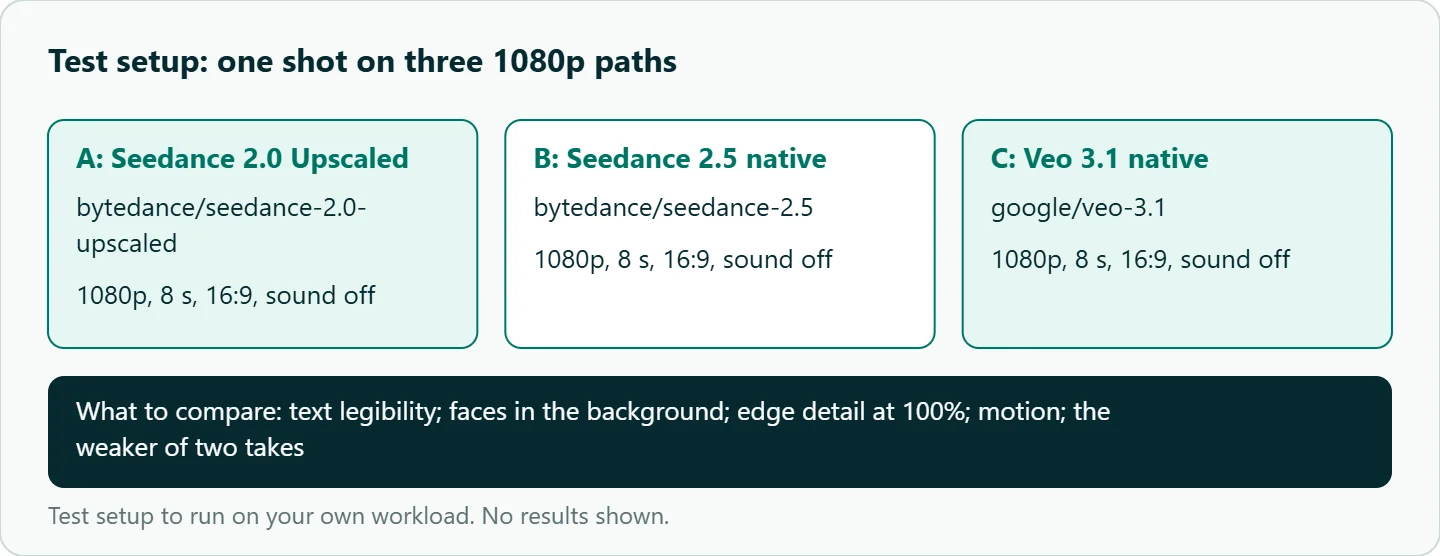
- Pick three shots from your real list: one face or product, one with readable text, one crowd or wide street.
- Render each at 1080p, 8 seconds, 16:9, sound off, on all three model ids.
- Use the same prompt text, adding only what a model requires.
- Run each twice and judge the weaker result, not the best one.
- Compare at 100% on the delivery screen: text legibility, faces in the background, edge detail, motion.
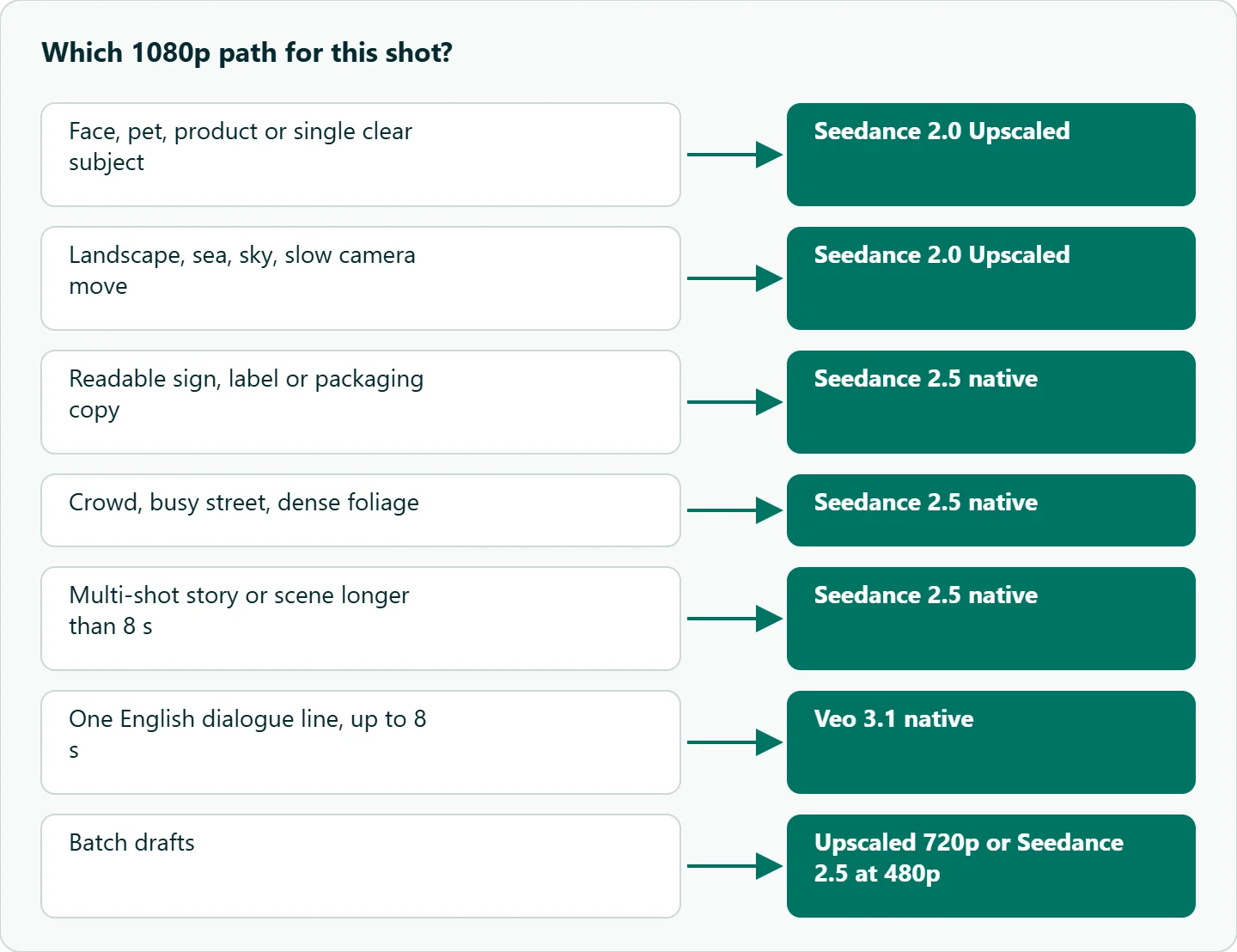
Our take: Use Seedance 2.0 Upscaled as the default 1080p path for faces, single subjects and landscapes, where our test found the enlarged detail held up. Move to native Seedance 2.5 the moment text, crowds, long multi-shot scenes or big reference packs enter the shot. Keep Veo 3.1 for single English dialogue takes up to 8 seconds where realism carries the scene.
| Your shot | Use | Why |
|---|---|---|
| Face, pet, product, single clear subject | bytedance/seedance-2.0-upscaled at 1080p |
Held up in our upscaling test |
| Landscape, sea, sky, slow camera move | bytedance/seedance-2.0-upscaled |
Natural texture upscales well |
| Readable sign, label or packaging copy | bytedance/seedance-2.5 native |
Small text cannot be recovered by upscaling |
| Crowd, busy street, dense foliage | bytedance/seedance-2.5 native |
Same reason: detail never in the source |
| Multi-shot story or scene longer than 8 s | bytedance/seedance-2.5 native |
Up to 30 s per call |
| One English dialogue line, up to 8 s | google/veo-3.1 at 1080p |
Fits one call; English fully supported |
| Square 1:1 delivery | Seedance (either) | Veo offers 16:9 and 9:16 only |
| Batch drafts | Upscaled 720p or Seedance 2.5 at 480p | Lower resolution is faster and cheaper |
Running it on OceanToken
On OceanToken all three paths sit behind one key and one base URL, https://api.oceantoken.ai/v1, so moving a shot from bytedance/seedance-2.0-upscaled to bytedance/seedance-2.5 or google/veo-3.1 is a one-field change, not a second vendor account. The API is OpenAI-compatible, billing comes from one prepaid balance with no subscription, and a failed video job is not charged and releases its hold, which matters when a test plan means dozens of retakes. See the current rates on /seedance-api and /veo-api, and the Upscaled vs Seedance 2.0 comparison for the upscale trade-off.
FAQ
Is Seedance 2.0 Upscaled real 1080p? It outputs approximately 1080p by upscaling a lower-resolution render. Detail that was clear in the small render survives; small text and distant faces do not.
Which is longer per call, Seedance 2.5 or Veo 3.1? Seedance 2.5 accepts 4 to 30 seconds; Veo 3.1 accepts 4, 6 or 8 seconds; check model-spec for which lengths 1080p accepts.
Which path should I use for on-screen text? A native render. Our upscaling test found signs stayed unreadable, so use Seedance 2.5 native and confirm the result at full size.
Can Veo 3.1 make square video? No. It offers 16:9 and 9:16; both Seedance paths accept 1:1.
Does a failed render cost anything? No. A failed job is not charged and its hold is released.
Sources
- OceanToken: Seedance 2.0 Upscaled, Tested (checked 2026-11-13)
- OceanToken docs: bytedance/seedance-2.0-upscaled (checked 2026-11-13)
- OceanToken docs: bytedance/seedance-2.5 (checked 2026-11-13)
- OceanToken docs: google/veo-3.1 (checked 2026-11-13)
- OceanToken docs: Video guide (checked 2026-11-13)
- ByteDance Seed: Introducing Seedance 2.5 (checked 2026-11-13)
- Google: Veo video generation docs (dialogue and duration notes) (checked 2026-11-13)
Get your OceanToken API key
- Create an OceanToken account and an API key.
- Copy the snippet below, paste your key, and run it.
- Check the current rate on /seedance-api.
curl https://api.oceantoken.ai/v1/videos \
  -H "Authorization: Bearer $OCEANTOKEN_API_KEY" \
  -H "Content-Type: application/json" \
  -d '{"model": "bytedance/seedance-2.0-upscaled", "prompt": "An orange cat asleep on a sunlit windowsill, macro close-up", "duration": 5, "resolution": "1080p", "aspect_ratio": "16:9"}'
More from the blog
Seedance 2.5 vs Wan 3.0 Prime by Job
Seedance 2.5 vs Wan 3.0 Prime for API video: what each call can hold, how each is billed, and which jobs to send to which model, with ids and code.
Official Kling API vs a Multi-Model Gateway
Official Kling API or a multi-model gateway? Kling versions, keys, concurrency and result links compared, plus a simple rule for which route fits your product.
Qwen API: Alibaba Direct vs a Gateway
Qwen API from Alibaba Model Studio direct vs an OpenAI-compatible gateway: regional keys and endpoints, workspaces, default thinking and enable_thinking.