

Kimi K3 vs Kimi K3.1 Pro: Which to Use
Kimi K3 vs Kimi K3.1 Pro by job: which takes tools, JSON and video on our API, how thinking and reasoning_content work, and what to change when you migrate.
By OceanToken Team
Editor's note: On paper Kimi K3 and K3.1 Pro look almost identical: the same million-token window, the same output cap, the same always-on thinking. The real difference on an API is what each id accepts. On our endpoint K3.1 Pro lists tools, JSON mode and video input, and K3 does not list all of them. For agents and code, that settles it before any benchmark does.
Short answer: For Kimi K3 vs Kimi K3.1 Pro, use moonshotai/kimi-k3.1-pro for tool-calling agents, coding, JSON output and video input, since its API reference lists all four. Keep moonshotai/kimi-k3 only for an existing pipeline without tools that already passes review. Both think on every request and need the full assistant message sent back each turn.
On OceanToken both ids run on the same key and the same OpenAI-compatible base URL, with email sign-up and card payment that work from outside China, so moving from K3 to K3.1 Pro is a change of model id plus the few fields listed below. Facts come from each id's API reference and Moonshot's own docs, read on November 21, 2026. We have not run the two side by side for this article, so the quality questions end in a test you can run yourself.
01 · Kimi K3 vs Kimi K3.1 Pro: what each id accepts
Moonshot calls K3 its previous-generation flagship and describes K3.1 Pro as the first model of the K3.1 series. Our model page calls K3.1 Pro a post-trained successor to K3; for K3's background, see What is Kimi K3. Here is what the API reference for each id on our endpoint lists:
| Detail | moonshotai/kimi-k3 |
moonshotai/kimi-k3.1-pro |
|---|---|---|
| Released (model page) | July 16, 2026 | October 23, 2026 |
| Context window | 1,048,576 tokens | 1,048,576 tokens |
Max output (max_tokens, reasoning included) |
943,718 | 943,718 |
| Content parts in messages | Text, image (video in its input list, no video_url part) |
Text, image, video |
tools |
Accepted, but may be served without it | Listed |
tool_choice, parallel_tool_calls |
Not listed | Listed |
response_format |
json_schema only; json_object not supported |
json_object and json_schema |
seed, logprobs, penalties |
May be served without them | Listed |
reasoning_effort |
Only none, and may be ignored |
Only none, and may be ignored |
| Reasoning in the reply | reasoning_content |
reasoning_content |
| Also served on | /v1/responses, /v1/messages |
/v1/responses, /v1/messages |
The reference marks some parameters as "accepted on this model, but depending on availability a request may be served without them, as if they had not been sent", and tells you not to rely on them. On K3 that list includes tools. That one row is the reason the rest of this article leans toward K3.1 Pro for agent work. The same goes for video: K3's model page and the input list in its reference include video, but its reference lists no video_url content part, while K3.1 Pro's does.
There is a mismatch to know about. The model pages for both ids show tool calling with tool_choice and reasoning with reasoning_effort, while the parameter references are stricter, as the table shows. When the two disagree, plan around the stricter one and test.
02 · Which Kimi for which job
Here is the routing we would set for a team. The limits come from section 01; the choices are our judgment.
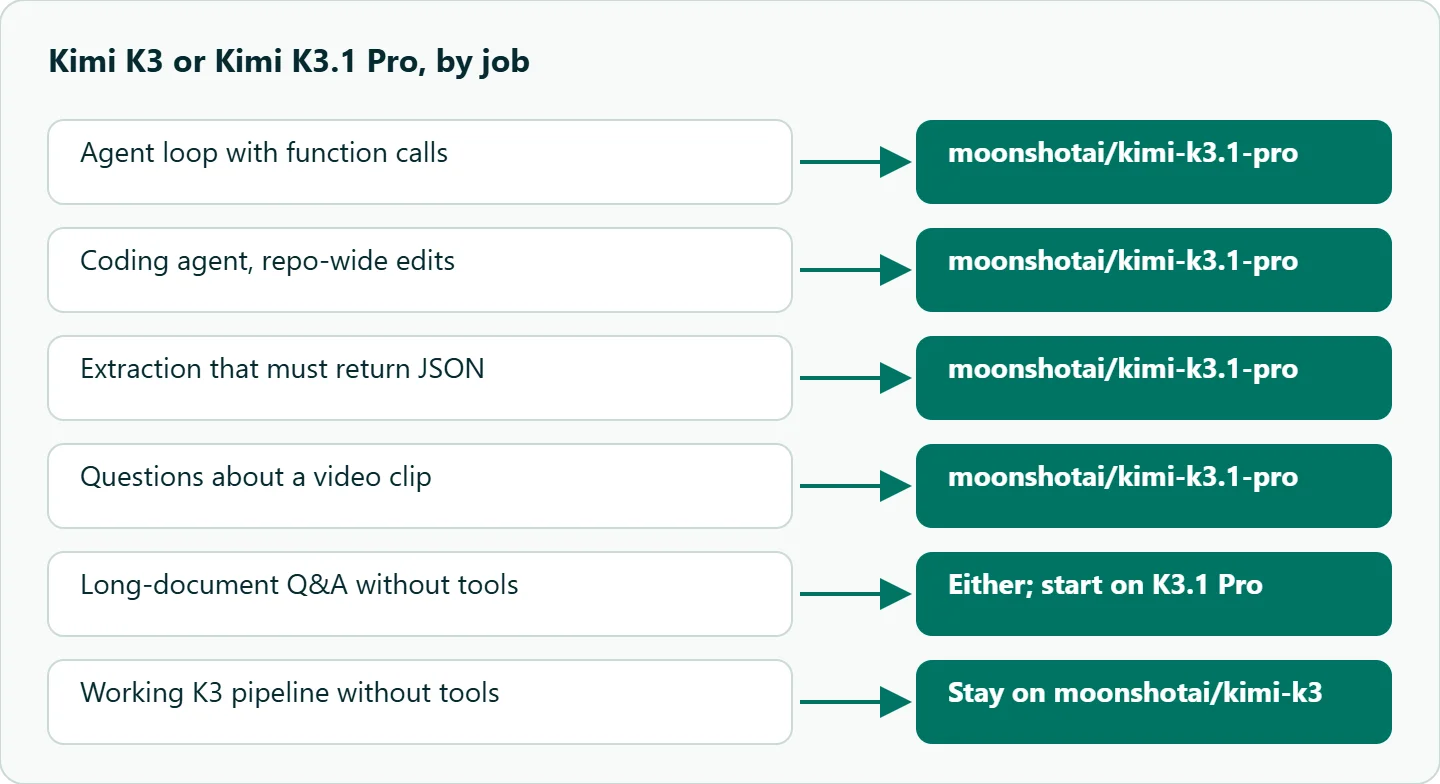
| Job | Model id | Why |
|---|---|---|
| Agent loop with function calls | moonshotai/kimi-k3.1-pro |
tools, tool_choice and parallel_tool_calls are listed |
| Coding agent, repo-wide edits | moonshotai/kimi-k3.1-pro |
Tools are needed; Moonshot reports K3.1 Pro ahead of K3 on its long-horizon code benchmark |
| Extraction that must return JSON | moonshotai/kimi-k3.1-pro |
Takes json_object and json_schema |
| Questions about a video clip | moonshotai/kimi-k3.1-pro |
Only K3.1 Pro's reference lists a video_url content part; K3's does not, though its page lists video input |
| Long-document Q&A without tools | Either; start on moonshotai/kimi-k3.1-pro |
Same window; K3 only if an existing prompt depends on it |
| Existing K3 pipeline without tools that passes review | Stay on moonshotai/kimi-k3 |
Do not change a working prompt without a test |
Most rows land on K3.1 Pro, and that is deliberate. When a newer version in the same family lists more of the API and is described by its maker as the stronger model, the burden of proof sits with staying, not with moving.
For price, see the current rate on /kimi-api before you plan a budget. Both model pages note that thinking tokens are billed at the output price, which matters more than the headline rate for a model that always thinks.
03 · Kimi K3.1 Pro for coding agents
For a coding agent, use K3.1 Pro. A coding agent is a tool-calling loop: read a file, run a test, edit, run again. On our endpoint, K3 lists tools among parameters that may be dropped, which means a request can come back as plain text instead of a tool call, and the loop stalls. K3.1 Pro lists tools, tool_choice and parallel_tool_calls as normal parameters.
Moonshot also positions K3.1 Pro for this work. Its quickstart says the gains over K3 are largest in code, 3D creation, financial research and long-horizon agent tasks. On its own Kimi Code Bench 3.0 Long-horizon, an internal benchmark, Moonshot reports 61.2 for K3.1 Pro against 55.95 for K3, and on Terminal-Bench 4.0 it reports 65.7 for K3.1 Pro. These are Moonshot's numbers, not ours, and an internal benchmark tells you more about the direction of travel than about your repo.
Three things from Moonshot's docs matter in an agent loop:
- Send the whole assistant message back. Each turn, append the assistant message exactly as returned, with
reasoning_contentandtool_calls, then yourtoolmessages with matchingtool_call_id. Section 04 explains why. - Force the first call when you need it.
tool_choice: "required"makes the model call a tool on the first turn, which is useful when the first step should always be reading the task file. - Leave sampling alone. Moonshot fixes
temperatureat 1.0,top_pat 0.95 and both penalties at 0 for these models and recommends not sending them. A low temperature copied from another model's config does not make K3.1 Pro more deterministic.
Moonshot also describes dynamic tool loading: a system message with a tools field placed where the tools should take effect. That is Moonshot's own extension, not part of OpenAI's request shape, and our reference does not mention it, so declare tools in the standard top-level tools array.
04 · Kimi K3.1 Pro thinking and reasoning_content
Kimi K3.1 Pro always thinks. Moonshot's quickstart says thinking cannot currently be turned off, for K3 and for K3.1 Pro alike, and on our endpoint the reasoning comes back in choices[].message.reasoning_content next to the answer in content (per both API references). Usage reports the thinking under usage.completion_tokens_details.reasoning_tokens, and it counts toward max_tokens.
On Moonshot's own API, reasoning_effort takes low, high or max, defaults to max, and is the suggested way to shorten long reasoning. Our references for both ids list reasoning_effort only among parameters that may be ignored, with none as the one value, which contradicts Moonshot's statement that thinking cannot be disabled. The practical reading: on this endpoint, assume the model thinks at its default every time, and do not build on reasoning_effort until a test shows it changes reasoning_tokens.
| Question | Answer on our endpoint |
|---|---|
| Can I turn thinking off? | No; Moonshot says it is always on |
| Can I lower effort? | Do not rely on reasoning_effort; measure reasoning_tokens if you try |
| Where is the reasoning? | choices[0].message.reasoning_content |
Does it count toward max_tokens? |
Yes, reasoning included |
| Must I send it back? | Yes, the full assistant message, unchanged |
| Should I parse JSON from it? | No; parse content only |
Sending reasoning back is the rule that breaks most ports from other models. Moonshot says to add the complete assistant message to the next request as it was returned, not just content, in multi-turn chat and in tool calls. Code written for a model that discards reasoning between turns will strip that field, and the agent loses the thread of its own plan. Our OpenAI-compatible API gotchas guide compares how different publishers treat reasoning history; for Kimi, the answer is to keep it.
Budget max_tokens with thinking in mind. Moonshot's default for max_completion_tokens is 131,072. A cap set for a model that does not reason can be spent entirely on thinking, and the reply arrives with empty content and finish_reason: "length".
05 · Migrate Kimi K3 to K3.1 Pro in the API
To migrate a Kimi K3 request to K3.1 Pro, change model, keep the full-message history rule, and then decide whether to use what K3.1 Pro adds: dependable tools, json_object and video input. A K3 request carries over unchanged otherwise, because every field K3 lists is also listed for K3.1 Pro.
| Field | On moonshotai/kimi-k3 |
On moonshotai/kimi-k3.1-pro |
Change needed |
|---|---|---|---|
model |
moonshotai/kimi-k3 |
moonshotai/kimi-k3.1-pro |
Yes |
messages history |
Full assistant message back | Full assistant message back | No |
tools |
May be dropped | Listed | Optional: rely on it now |
tool_choice |
Not listed | auto, none, required or a named function |
Optional |
response_format |
json_schema |
json_object or json_schema |
No; json_object now possible |
video_url parts |
Not listed | Listed | Optional |
max_tokens |
Up to 943,718 | Up to 943,718 | Re-check against usage |
temperature, top_p, penalties |
Fixed by Moonshot | Fixed by Moonshot | Remove if you send them |
A typical K3 request:
from openai import OpenAI
import os

client = OpenAI(base_url="https://api.oceantoken.ai/v1",
                api_key=os.environ["OCEANTOKEN_API_KEY"])

resp = client.chat.completions.create(
    model="moonshotai/kimi-k3",
    messages=[{"role": "user", "content": "Summarize the attached spec in five bullets."}],
    max_tokens=32000,
)
The same job on K3.1 Pro, now as an agent turn with a tool and the history rule applied:
tools = [{"type": "function", "function": {
    "name": "read_file",
    "description": "Read a file from the repository",
    "parameters": {"type": "object", "properties": {"path": {"type": "string"}}, "required": ["path"]}}}]

messages = [{"role": "user", "content": "Find why test_refund fails and propose a fix."}]
resp = client.chat.completions.create(
    model="moonshotai/kimi-k3.1-pro",
    messages=messages, tools=tools, tool_choice="required", max_tokens=32000,
)
msg = resp.choices[0].message
messages.append(msg.model_dump(exclude_none=True))   # keeps reasoning_content and tool_calls
for call in msg.tool_calls or []:
    messages.append({"role": "tool", "tool_call_id": call.id, "content": open("tests/test_refund.py").read()})
A short migration checklist:
- Change
modelin config, not in code, so you can roll back. - Remove any
temperature,top_por penalties you send. - Confirm your history code appends the whole assistant message, including
reasoning_content. - Raise
max_tokensif replies end withfinish_reason: "length". - Run your fixed eval prompts on K3.1 Pro before moving traffic.
- Only then turn on what is new:
tool_choice,json_object, video parts.
If you have not set up access yet, our Kimi K3 international access guide covers sign-up, payment and the first call; the steps are the same for K3.1 Pro.
06 · Pitfalls when you switch between Kimi ids
| Situation | What happens | What to do |
|---|---|---|
Agent on K3 with tools |
The reference says a request may be served without tools | Move agents to K3.1 Pro |
response_format: {"type": "json_object"} on K3 |
Not supported on K3, per its reference | Give a json_schema, or use K3.1 Pro |
History strips reasoning_content |
Moonshot requires the full message back | Append the message as returned |
Low max_tokens |
Thinking uses the cap; empty content, finish_reason: "length" |
Raise the cap; watch reasoning_tokens |
reasoning_effort: "low" to save tokens |
Not in our reference's values; may be ignored | Measure before relying on it |
| Image by public URL | Moonshot's own API takes data URLs or file ids for images; our reference accepts https or data URLs | If a URL fails, send a data URL |
| Video on K3 | Its page lists video input, but its reference has no video_url part |
Test one clip, or use K3.1 Pro |
The image row deserves a test. Moonshot's quickstart says public image URLs are not supported for vision input on its own API, while our reference describes image_url as "a public https:// URL or a data URL". Send one of each before a batch depends on URLs.
How to test this on your workload
We have not run K3 and K3.1 Pro against each other for this article. This setup tells you whether moving matters for your traffic:
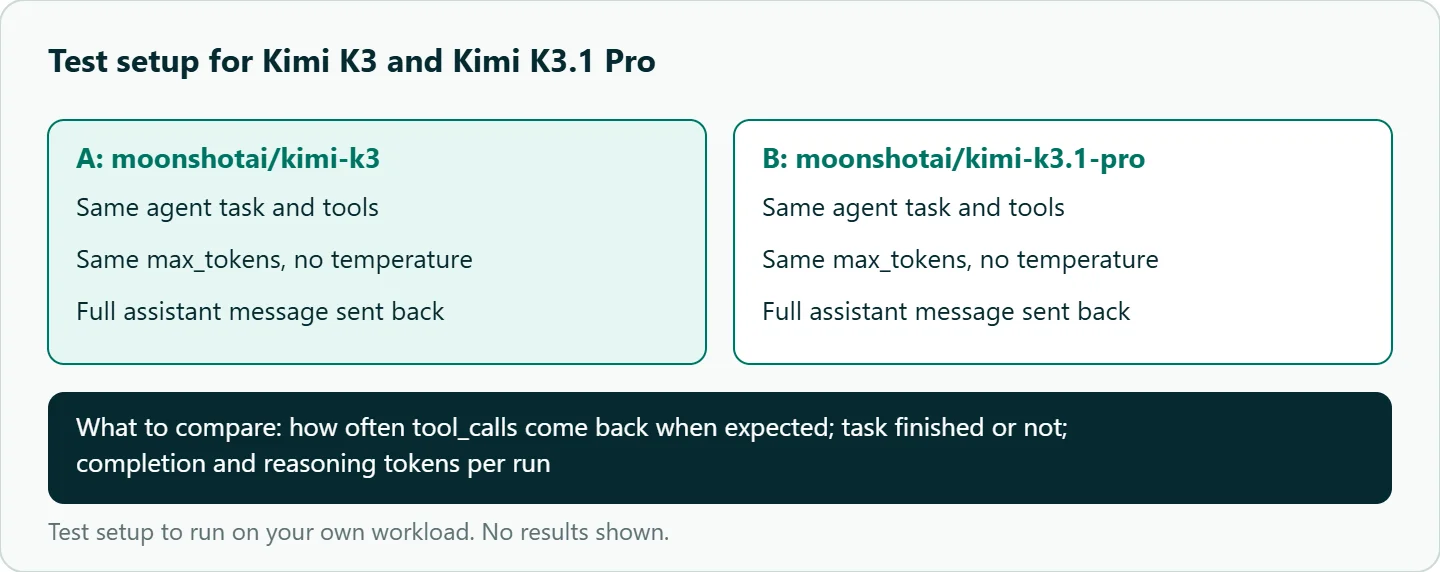
- Pick one real agent task with three or more tool calls, such as finding and fixing a failing test in a small repo.
- Run it ten times on each id with the same tools, prompt and
max_tokens, and notemperature. - Count how often each run returns
tool_callswhen it should, and how often it finishes the task. - Log
usage.completion_tokensandreasoning_tokensper run; thinking is billed as output. - Send one request with
reasoning_effort: "low"and one without, and comparereasoning_tokens, to see whether the field has any effect here. - Send one image by https URL and one as a data URL, and one short
video_urlclip to K3.1 Pro, and the same short clip to K3, to see whether it is accepted. - Check each run's charge in the console's Logs.
| What you see | Use |
|---|---|
| K3 runs come back without tool calls | moonshotai/kimi-k3.1-pro for every agent |
| Both finish the task, similar tokens | moonshotai/kimi-k3.1-pro; check its current rate |
| A non-agent K3 prompt is better on K3 in blind review | Keep that one prompt on moonshotai/kimi-k3 |
reasoning_effort changes nothing |
Control length with max_tokens and prompt scope |
Our take: Move to Kimi K3.1 Pro. It lists everything an agent needs on our endpoint, and Moonshot describes it as the stronger model for code. Keep K3 only for a prompt that already works without tools and that a blind review prefers. Whichever you use, send the full assistant message back every turn and budget for thinking you cannot switch off.
Running it on OceanToken
Both Kimi ids run at the OpenAI-compatible base URL https://api.oceantoken.ai/v1 on POST /v1/chat/completions, and the references also list /v1/responses and /v1/messages, so code written for OpenAI's or Anthropic's request shape can call Kimi without a rewrite. Switching between K3 and K3.1 Pro, or to another model in the catalog, is a change of model id on the same key.
The account is one prepaid balance with no subscription, opened with an email address and a card, which is the practical way to use Moonshot's models from outside China without a separate Moonshot account. See the current rate on /kimi-api.
FAQ
Is Kimi K3.1 Pro a new model or an update of K3? Our model page calls it a post-trained successor to K3, and Moonshot describes it as the first model in the K3.1 series. It has its own id, moonshotai/kimi-k3.1-pro.
Can I turn off thinking on Kimi K3.1 Pro? No. Moonshot says thinking is always on for K3 and K3.1 Pro, and the reasoning arrives in reasoning_content.
Do I have to send reasoning_content back? Yes, as part of the full assistant message, which Moonshot says to append unchanged in multi-turn chat and tool calls.
Which one should a coding agent use? K3.1 Pro. Its reference lists tools, tool_choice and parallel_tool_calls; K3's reference says tools may be dropped.
Do my K3 prompts work on K3.1 Pro? The request carries over with a model id change, but a newer model reads prompts differently, so rerun your eval set before moving traffic.
Sources
- OceanToken docs: Kimi K3 spec (JSON) (checked 2026-11-21)
- OceanToken docs: Kimi K3.1 Pro spec (JSON) (checked 2026-11-21)
- OceanToken: Kimi K3 model page (checked 2026-11-21)
- OceanToken: Kimi K3.1 Pro model page (checked 2026-11-21)
- Moonshot AI: Kimi K3 quickstart (checked 2026-11-21)
- Moonshot AI: Kimi K3.1 Pro quickstart (checked 2026-11-21)
- Moonshot AI: Reasoning effort (checked 2026-11-21)
Get your OceanToken API key
- Create an OceanToken account and an API key.
- Copy the snippet below, paste your key, and run it.
- Check the current rate on /kimi-api.
curl https://api.oceantoken.ai/v1/chat/completions \
  -H "Authorization: Bearer $OCEANTOKEN_API_KEY" \
  -H "Content-Type: application/json" \
  -d '{"model": "moonshotai/kimi-k3.1-pro", "messages": [{"role": "user", "content": "Explain what a context window is in two sentences."}], "max_tokens": 16000}'
More from the blog
Qwen3.8 Max vs GLM 5.3 vs DeepSeek V4 Pro
Qwen3.8 Max vs GLM 5.3 vs DeepSeek V4 Pro by job: coding agents, tool calling and JSON, long context, and how each handles thinking and reasoning_content.
Wan 3.0 Prime vs Veo 3.1: Image to Video
Wan 3.0 Prime vs Veo 3.1 image to video on one API: first and last frame fields, reference image limits, lengths, shapes and which model fits each shot type.
GTE-Large vs BGE-M3 for Multilingual RAG
GTE-Large vs BGE-M3 for RAG: English-only and 512 tokens vs 100+ languages and 8K input, what /v1/embeddings returns, and how chunking changes.