

GTE-Large vs text-embedding-3-small in RAG
GTE-Large vs text-embedding-3-small for RAG: English or multilingual, 512 or 8K tokens, 1024 or 1536 dimensions, and why a switch means a full reindex.
By OceanToken Team
Editor's note: People pick an embedding model as if it were a setting they can change later. It is closer to a database schema. Every vector in your index is tied to the model that made it, so the real cost of a wrong pick is not the per-token rate, it is re-embedding the whole corpus. Choose on language and chunk length first, and treat the choice as a migration if you ever revisit it.
Short answer: For RAG, use GTE-Large when your corpus is English and you can keep chunks under 512 tokens. Use text-embedding-3-small when text is multilingual or passages run long, since it reads up to 8,191 tokens. Switching later means re-embedding every document and rebuilding the index.
01 · The two models side by side
Both models do the same job in a retrieval pipeline: turn a chunk of text into a vector so a query can find its nearest neighbours. They differ in the three things that decide whether retrieval works at all, which are language, how much text they read and the size of the vector they return. From the model pages, the docs and each publisher's own documentation, checked November 18, 2026:
| GTE-Large | text-embedding-3-small | |
|---|---|---|
| Model id | thenlper/gte-large |
openai/text-embedding-3-small |
| Publisher | Thenlper (open model, MIT license) | OpenAI |
| Language | English only, per its model card | OpenAI describes better multilingual performance than its earlier model |
| Input limit | 512 tokens; longer text is truncated | 8,191 tokens on the model page |
| Vector size | 1024, fixed | 1536 by default |
| Shorter vectors | No | OpenAI offers a dimensions parameter; see section 03 |
| Endpoint | POST /v1/embeddings |
POST /v1/embeddings |
| Billing | Per input token | Per input token |
Pricing is per input token for both and there is no output charge. The rates sit on the GTE-Large page, the text-embedding-3-small page and, ranked, on /cheapest/embedding-api. An embedding request is billed on input only and each chunk is embedded once, while generation bills output tokens on every query, so fit matters more than the rate here; check the rate second.
02 · Picking by corpus: GTE-Large vs text-embedding-3-small
Language comes first because it is a hard limit, not a quality gradient. The GTE-Large model card says the model "exclusively caters to English texts." If your help center has German and Japanese articles, or your users ask questions in Spanish, GTE-Large is the wrong tool no matter how well it does on English benchmarks.
Chunk length comes second. GTE-Large reads 512 tokens and drops the rest, without an error. That is fine for FAQ entries, product descriptions and support answers, which are short anyway. It is a problem for contracts, research papers or long code files where you would rather embed whole sections. text-embedding-3-small reads far more per input, so you can chunk by section instead of by paragraph.
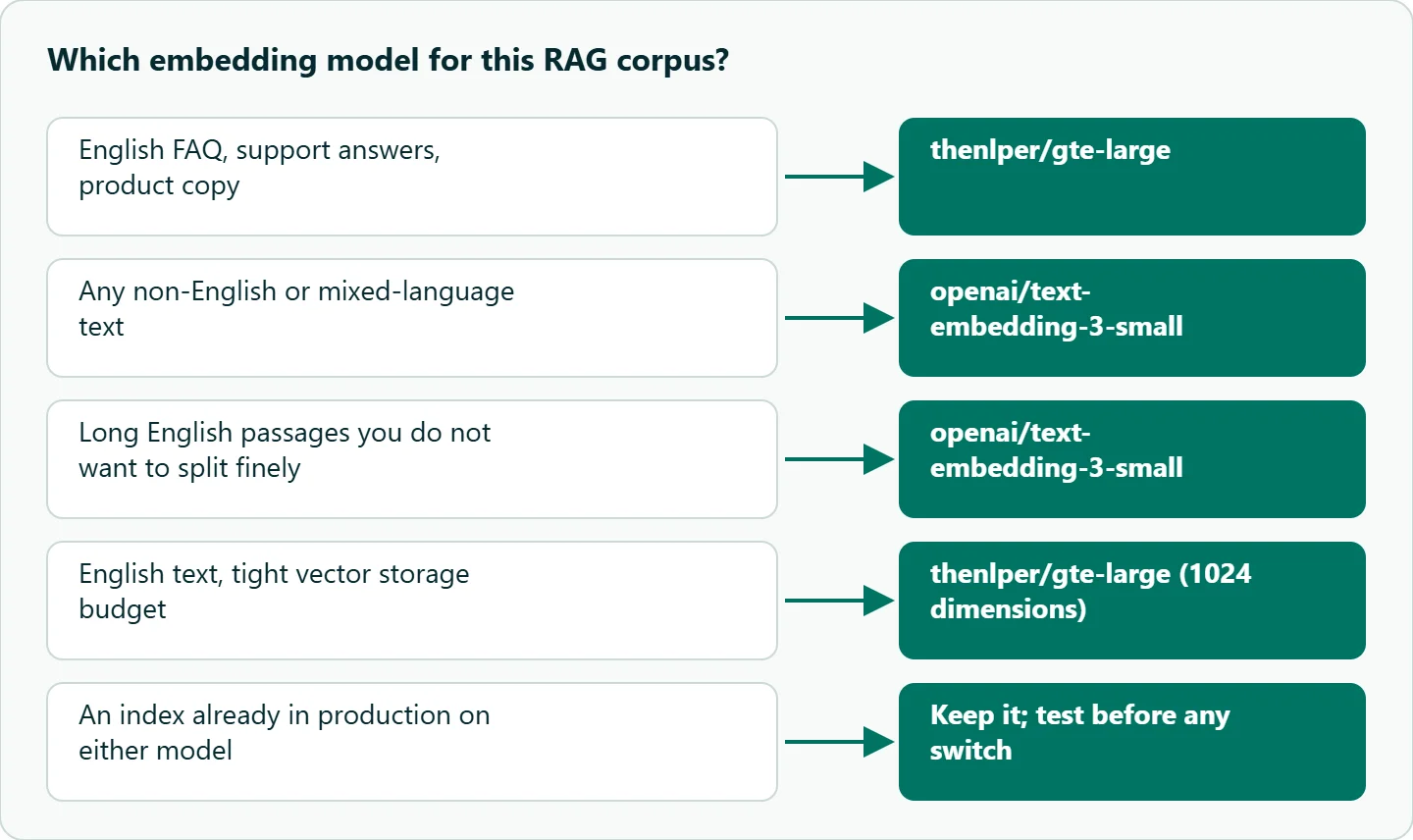
| Your corpus | Use | Why |
|---|---|---|
| English FAQ, support answers, product copy | thenlper/gte-large |
Short text fits the 512-token window; smaller 1024-dimension vectors |
| Any non-English or mixed-language text | openai/text-embedding-3-small |
GTE-Large is English only |
| Long English passages you do not want to split finely | openai/text-embedding-3-small |
8,191-token input instead of 512 |
| English text, tight vector storage budget | thenlper/gte-large |
1024 dimensions, fixed, against 1536 by default; no need to depend on dimensions |
| An index already in production on either model | Keep it | A switch means re-embedding everything; test first (section 05) |
One nuance on the long-passage row: a bigger input window is not automatically better retrieval. A single vector for a 6,000-token section averages over a lot of topics, and many teams still chunk smaller for precision. The point is that with text-embedding-3-small the chunk size is your decision, while with GTE-Large it is capped for you.
03 · The dimensions parameter: check what comes back
OpenAI's embeddings guide says text-embedding-3-small returns 1536 numbers by default and that you can pass dimensions to get a shorter vector. Only if you cut a full vector down yourself do you need to normalize it again. The embeddings guide in our docs also names openai/text-embedding-3-small as a model that offers dimensions.
Here is the catch. The model's own reference page , as of today, lists only model, input and encoding_format, and says anything else in the request is left out before it reaches the model. The GTE-Large reference lists the same three. On GTE-Large that is expected, since the model has one vector size. On text-embedding-3-small the two docs pages disagree, so do not size an index from your config file. Send one request with dimensions and read the length that comes back:
r = client.embeddings.create(model="openai/text-embedding-3-small",
                             input="probe", dimensions=512)
print(len(r.data[0].embedding))   # size the index from this number
If it prints 1536, the parameter was dropped and your index needs 1536 columns. Either way, the safe habit is the same one our GTE-Large calling guide recommends: create the vector index from the first real response, never from a constant.
04 · Switching models means rebuilding the index
Our docs' embeddings guide puts the rule in one line: "Vectors from different models cannot be compared." A query embedded with text-embedding-3-small cannot search documents embedded with GTE-Large. The sizes differ (1024 against 1536), but even two models with the same size place meanings in unrelated directions. There is no conversion step.
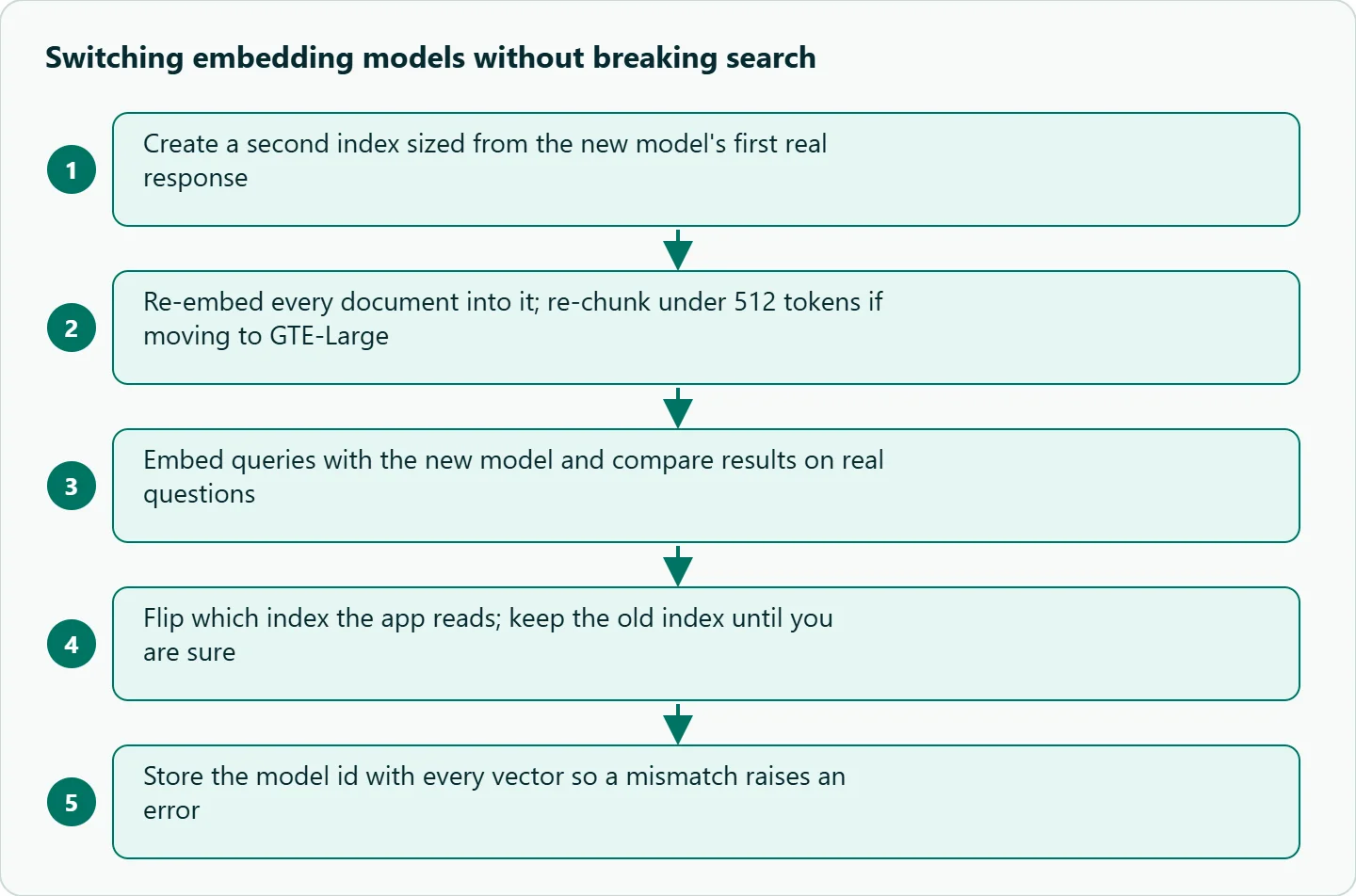
So a switch is a migration. Create a second index sized for the new model, re-embed every document into it, and re-chunk if you are moving to GTE-Large, because chunks written for an 8K window will be cut at 512. Then embed queries with the new model, compare results on real queries, and move traffic by flipping which index the app reads. Keep the old index until you are sure. Doing it this way means search never returns a mix of old and new vectors, which is the failure that is hardest to spot: results still come back, they are just wrong.
Because both models sit on the same endpoint and take the same request shape, the code change itself is one string:
import os
from openai import OpenAI

client = OpenAI(base_url="https://api.oceantoken.ai/v1",
                api_key=os.environ["OCEANTOKEN_API_KEY"])

EMBED_MODEL = os.getenv("EMBED_MODEL", "thenlper/gte-large")  # or openai/text-embedding-3-small
resp = client.embeddings.create(model=EMBED_MODEL, input=["chunk one", "chunk two"])
dim = len(resp.data[0].embedding)   # 1024 for GTE-Large, 1536 for text-embedding-3-small by default
Store the model id next to every vector or on the index itself. When someone changes EMBED_MODEL without a reindex, a check on that field turns a silent quality drop into an error.
How to test this on your workload
We have not run a retrieval comparison for this article. A small, honest test takes an afternoon:
- Collect 50 real user questions and mark the passage that answers each one.
- Build two indexes from the same documents: GTE-Large with chunks under 512 tokens, and text-embedding-3-small with the same chunks.
- Record how often the right passage lands in the top three for each index.
- Add a third index with text-embedding-3-small on longer, section-sized chunks, to see whether the bigger window helps your documents.
- If any content is not English, score those questions separately; that slice usually decides the question.
- Send one request with
dimensionsto text-embedding-3-small and note the returned length before you plan storage around it.
Our take: For an English-only knowledge base with short chunks, start with GTE-Large: it is small, open and does exactly that job. The moment you have non-English content or long passages you do not want to split, use text-embedding-3-small instead. And if an index is already live, leave it alone until the test above shows a clear gap, because the switch costs a full re-embed.
Running it on OceanToken
On OceanToken both models answer at https://api.oceantoken.ai/v1/embeddings with the same key: thenlper/gte-large and openai/text-embedding-3-small. The endpoint follows OpenAI's Embeddings API, so the official SDK works with only the base URL and key changed, and running the side-by-side test above is a change of model id rather than a second account. Billing comes from one prepaid balance with no subscription, and the same key covers chat models for the generation half of your RAG pipeline. See the current rates on the models catalog or /cheapest/embedding-api.
FAQ
Is GTE-Large or text-embedding-3-small better for RAG? GTE-Large fits English text in short chunks; text-embedding-3-small fits multilingual text and long passages. Test both on your own questions before switching a live index.
Can I mix vectors from the two models in one index? No. Vectors from different models cannot be compared, so each model needs its own index.
What vector size should I set for each? 1024 for GTE-Large and 1536 for text-embedding-3-small by default. Read the length from the first response rather than hard-coding it.
Does the dimensions parameter work on text-embedding-3-small? OpenAI supports it, but the model's reference page in our docs does not list it today. Send one test request and check the returned length.
What happens to text over 512 tokens with GTE-Large? It is truncated, so the end of the chunk never reaches the vector.
How are the two models billed? Both per input token, with no output charge. Rates are on each model page.
Sources
- OceanToken: GTE-Large model page (checked 2026-11-18)
- OceanToken: Text Embedding 3 Small model page (checked 2026-11-18)
- OceanToken docs: thenlper/gte-large reference (checked 2026-11-18)
- OceanToken docs: openai/text-embedding-3-small reference (checked 2026-11-18)
- OceanToken docs: Embeddings and rerank (checked 2026-11-18)
- thenlper/gte-large model card (checked 2026-11-18)
- OpenAI: Vector embeddings guide (checked 2026-11-18)
Get your OceanToken API key
- Create an OceanToken account and an API key.
- Copy the snippet below, paste your key, and run it.
- Check the current rate on /cheapest/embedding-api.
curl https://api.oceantoken.ai/v1/embeddings \
  -H "Authorization: Bearer $OCEANTOKEN_API_KEY" \
  -H "Content-Type: application/json" \
  -d '{"model": "thenlper/gte-large", "input": ["first chunk", "second chunk"]}'
More from the blog
Qwen3.8 Max vs GLM 5.3 vs DeepSeek V4 Pro
Qwen3.8 Max vs GLM 5.3 vs DeepSeek V4 Pro by job: coding agents, tool calling and JSON, long context, and how each handles thinking and reasoning_content.
Wan 3.0 Prime vs Veo 3.1: Image to Video
Wan 3.0 Prime vs Veo 3.1 image to video on one API: first and last frame fields, reference image limits, lengths, shapes and which model fits each shot type.
GTE-Large vs BGE-M3 for Multilingual RAG
GTE-Large vs BGE-M3 for RAG: English-only and 512 tokens vs 100+ languages and 8K input, what /v1/embeddings returns, and how chunking changes.