

GTE-Large vs BGE-M3 for Multilingual RAG
GTE-Large vs BGE-M3 for RAG: English-only and 512 tokens vs 100+ languages and 8K input, what /v1/embeddings returns, and how chunking changes.
By OceanToken Team
Editor's note: Most embedding comparisons start from leaderboard scores. For these two models the decision comes earlier and is much plainer: what language is your corpus in, and how long are the passages you want to retrieve? GTE-Large is an English model that reads 512 tokens. BGE-M3 reads more than 100 languages and up to 8K tokens. If both answers are English and short, GTE-Large is enough; if either is not, BGE-M3.
Short answer: In GTE-Large vs BGE-M3, pick thenlper/gte-large for English text you can chunk under 512 tokens. Pick baai/bge-m3 when documents or user questions include other languages, mix languages, or run long enough that 512-token chunks split the answer. Both return 1024-dimension vectors, so the deciding factors are language and input length.
On OceanToken both models sit behind the same OpenAI-compatible /v1/embeddings endpoint and the same API key, so you can build a test index for each by changing one string, and keep chat and video models on that key too. The specs below come from each model's API reference and from the model cards, read on November 21, 2026. We have not run a retrieval benchmark for this article, so the quality question ends in a test you can run on your own data.
01 · GTE-Large vs BGE-M3 side by side
The two models produce vectors of the same length, which makes them look interchangeable. They are not, because what goes in differs a lot more than what comes out.
| Detail | thenlper/gte-large |
baai/bge-m3 |
|---|---|---|
| Languages (model card) | English only | More than 100 |
| Input limit on our endpoint | 512 tokens | 8,194 tokens |
| Input limit (model card) | 512 tokens, longer text truncated | 8,192 tokens |
| Dense vector size | 1024 | 1024 |
| Outputs described by the publisher | One dense vector | Dense, sparse (lexical weights), multi-vector |
Outputs on /v1/embeddings |
One vector per input | One vector per input |
| Request fields listed | model, input, encoding_format |
model, input, encoding_format |
dimensions (shorter vectors) |
Not listed | Not listed |
| Query prefix needed | None in the card's examples | No; the card says instructions are no longer needed |
Two rows decide most projects. The language row is a hard limit: the GTE-Large card states the model "exclusively caters to English texts", so a Spanish or Chinese query is embedded, but not in a space the model was trained to make meaningful. The input row decides how you chunk, which in practice shapes retrieval quality as much as the model does.
The output rows matter for a different reason. BAAI built BGE-M3 to give three kinds of representation from one pass, and much of what is written about it assumes you get all three. Over an OpenAI-style embeddings call you get one of them. Section 03 covers what that means for a hybrid setup.
02 · Multilingual embedding model for RAG: pick by corpus
For a multilingual RAG system, BGE-M3 is the default of the two, because GTE-Large is trained on English only. That holds even when most of your documents are English: one Japanese support ticket or a German product manual in the corpus lands in a vector space the model was never trained to make meaningful for that language, so those passages are the ones retrieval will miss.
Here is the routing we would set up. The limits come from section 01; the choices are our judgment.
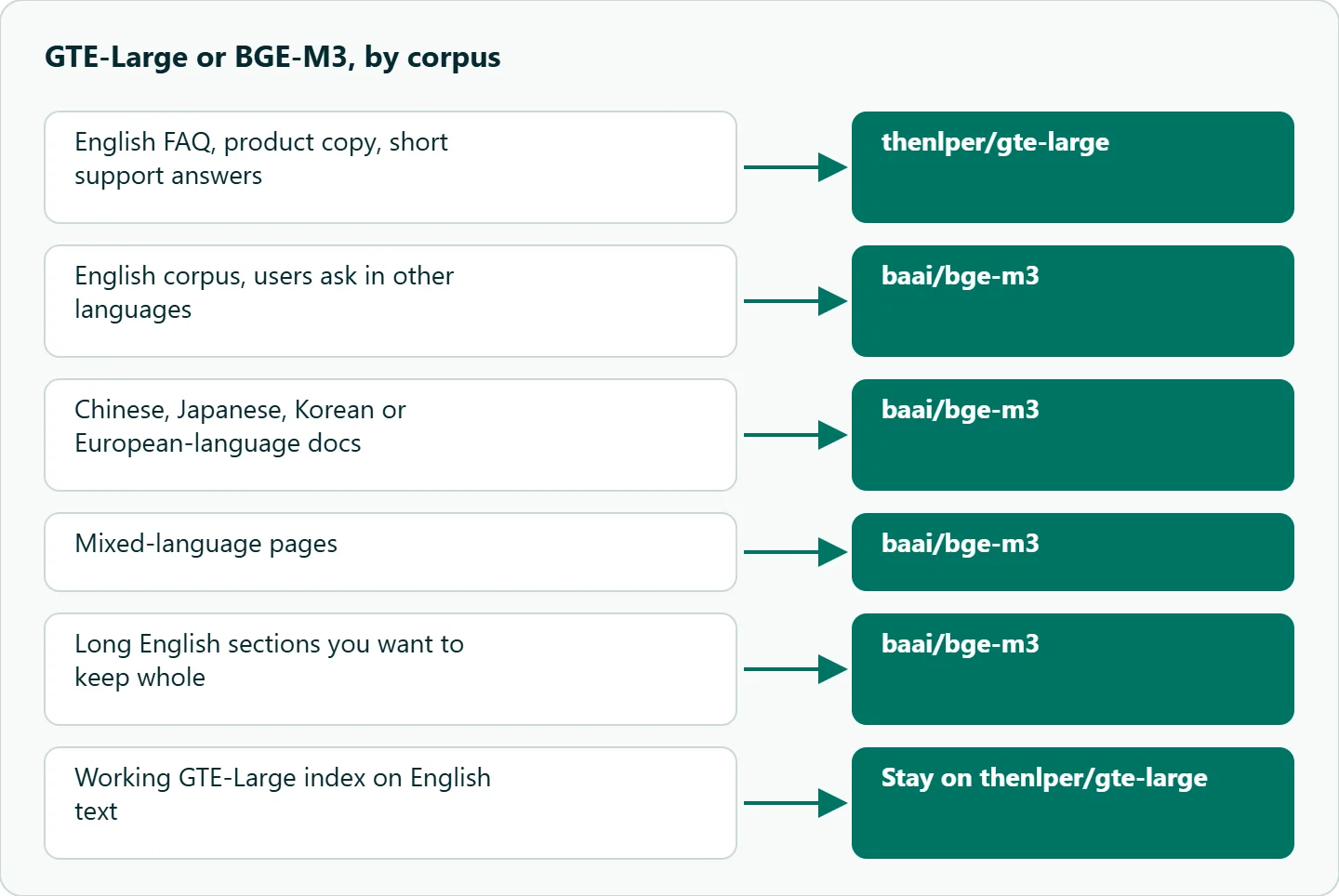
| Your corpus and queries | Model id | Why |
|---|---|---|
| English FAQ, product copy, short support answers | thenlper/gte-large |
Short English text fits 512 tokens; nothing here needs more |
| English corpus, users ask in other languages | baai/bge-m3 |
Queries and documents must share one space; GTE-Large reads English only |
| Chinese, Japanese, Korean or European-language docs | baai/bge-m3 |
Multilingual training, per the BAAI card |
| Mixed-language pages, such as English with Chinese terms | baai/bge-m3 |
Mixed text is where an English-only model is least reliable |
| Long English sections you want to keep whole | baai/bge-m3 |
Input up to 8,194 tokens on our endpoint |
| Existing GTE-Large index on English text that passes review | Stay on thenlper/gte-large |
A switch means re-embedding everything |
The second row is the one teams miss. A help center written in English looks like an English corpus, so GTE-Large seems safe. Then the product launches in Brazil, users type questions in Portuguese, and retrieval quality drops for those users without any error in the logs. Embedding models do not reject a language they were not trained on. They return a vector anyway, and the vector is just less useful.
If your traffic is English today but you expect that to change, start on BGE-M3. Re-embedding a corpus later is not hard, but it is a migration, and our GTE-Large vs text-embedding-3-small comparison walks through why a model switch always means rebuilding the index. We will not repeat that here.
03 · BGE-M3 dense vs sparse on an OpenAI-compatible API
On an OpenAI-compatible embeddings endpoint, BGE-M3 gives you its dense vector only. The API reference for baai/bge-m3 returns one array per input under data[].embedding, plus token usage, and lists no field for lexical weights or multi-vector output. That is the difference between the model and the API you call it through, and it changes how you build hybrid search.
The BAAI model card describes three modes. Dense retrieval is one vector per text, compared by similarity. Sparse, or lexical, retrieval gives a weight to each token in the text, much like BM25 keyword scoring. Multi-vector retrieval, in the ColBERT style, keeps a vector per token and scores fine-grained matches. The card gets these through BAAI's own FlagEmbedding library, with flags such as return_sparse=True and return_colbert_vecs=True, and it recommends "hybrid retrieval + re-ranking" for RAG.
None of those flags exist in OpenAI's embeddings request shape, so a hosted, OpenAI-compatible call has no place to ask for them. Our API reference says a parameter the chosen model does not support is dropped and the request runs without it, so sending return_sparse changes nothing and raises no error.
| Want | On /v1/embeddings |
What to do instead |
|---|---|---|
| Dense vectors | Yes, data[].embedding |
Use as is |
| Sparse lexical weights | Not returned | Run a keyword index (BM25) next to the vector index |
| Multi-vector (ColBERT-style) | Not returned | Use a rerank step on the top results |
| Hybrid score | Not returned | Merge vector and keyword results in your app, then rerank |
In practice the hybrid recipe still works; you assemble it from parts. Most search engines and vector databases ship a keyword index, and combining its ranking with the dense results (for example with reciprocal rank fusion) covers what BGE-M3's sparse output would have given you: exact matches on product codes, names and rare terms that dense vectors tend to blur.
For the last step, the same key also calls a rerank endpoint. The OceanToken docs describe POST /v1/rerank in Cohere's request shape, which takes a query and a list of documents and returns them in order of relevance. A reranker reading the top 20 or 50 candidates does much of the fine-grained matching that multi-vector scoring is meant for.
04 · GTE-Large 512 token limit vs BGE-M3 long input
The input limit decides your chunk size. GTE-Large reads at most 512 tokens per input, and its model card says longer text "will be truncated", so anything past that point never reaches the vector. BGE-M3 reads up to 8,194 tokens per input on our endpoint, which lets you embed a whole section instead of a paragraph.
Truncation is the dangerous part, because it is silent in the model card's description. A 900-token chunk sent to GTE-Large still returns a normal vector. It just represents the first 512 tokens, and if the answer sits in the second half of the chunk, retrieval will never find it. How our endpoint handles an over-long input to each id is not spelled out in the reference, so treat it as a test item: send one input you know is too long and look at usage.prompt_tokens and whether the call succeeds.
| Content | Chunk plan on GTE-Large | Chunk plan on BGE-M3 |
|---|---|---|
| FAQ entries, product blurbs | One entry per chunk | One entry per chunk |
| Support articles | Split by subheading, keep each under 512 tokens | One chunk per article section |
| Contracts, policies, research papers | Split by paragraph with overlap | Split by clause or section |
| Code files | Split by function | Split by class or file section |
| Chat logs, tickets | One message or short thread per chunk | Whole thread if it fits |
Longer is not automatically better. A long chunk gives the model more context to embed, but it also blends several topics into one vector, which can make it match many questions loosely and none of them well. Our advice on BGE-M3 is still to chunk to a few hundred tokens and treat the longer limit as headroom, so that a long table or a dense clause does not get cut in half.
A practical middle ground: chunk on document structure (headings, clauses, functions) rather than a fixed token count, then check the length of every chunk against the model's limit before embedding. With GTE-Large that check will split many sections. With BGE-M3 it rarely triggers, which is the point.
Token counts also differ by language. A paragraph in Chinese or Japanese can run to a different token count than its English translation, so measure with the model's own tokenizer or with usage.prompt_tokens on a sample, instead of assuming a fixed number of words per token.
05 · Calling GTE-Large and BGE-M3 with one model id change
Both models take the same three fields on the same endpoint, so the code is identical apart from the model id. With the OpenAI Python SDK:
import os
from openai import OpenAI

client = OpenAI(base_url="https://api.oceantoken.ai/v1",
                api_key=os.environ["OCEANTOKEN_API_KEY"])

MODEL = "baai/bge-m3"   # or "thenlper/gte-large"

chunks = [
    "Refunds reach your card within 10 days of the return arriving.",
    "退货到达后 10 天内,退款会退回您的银行卡。",
    "La devolución llega a tu tarjeta en un plazo de 10 días.",
]

resp = client.embeddings.create(model=MODEL, input=chunks)
vectors = [item.embedding for item in resp.data]
print(MODEL, len(vectors), len(vectors[0]), resp.usage.prompt_tokens)
The answer has one vector per input, in the same order, and the token count you are billed on.
| Field | Values | Notes |
|---|---|---|
model |
thenlper/gte-large or baai/bge-m3 |
Use the same id for documents and queries |
input |
A string or a list of strings | Batch many chunks in one call |
encoding_format |
float (default) or base64 |
base64 makes large batches smaller on the wire |
Three rules from the embeddings guide apply to both. Send a list of chunks per request rather than one call each. Embed queries with the same model as the documents, because vectors from different models cannot be compared. And since neither id lists dimensions, size your vector column for 1024 and confirm with len(vectors[0]) before you create the index.
On normalization: GTE-Large's reference code applies an optional L2 normalization, and BGE-M3's card scores pairs with a plain dot product. If your vector store uses cosine similarity, normalization does not matter. If it uses dot product, normalize vectors yourself so both models are compared on equal terms in your test.
If you already run GTE-Large and want to try BGE-M3, do not mix the two in one index. Build a second index, compare, then switch which index your app reads. Our GTE-Large embedding API guide covers the basic call in more detail.
How to test this on your workload
We have not measured retrieval quality for these two models. This setup tells you which one fits your corpus. It needs a labeled question set and a short script.
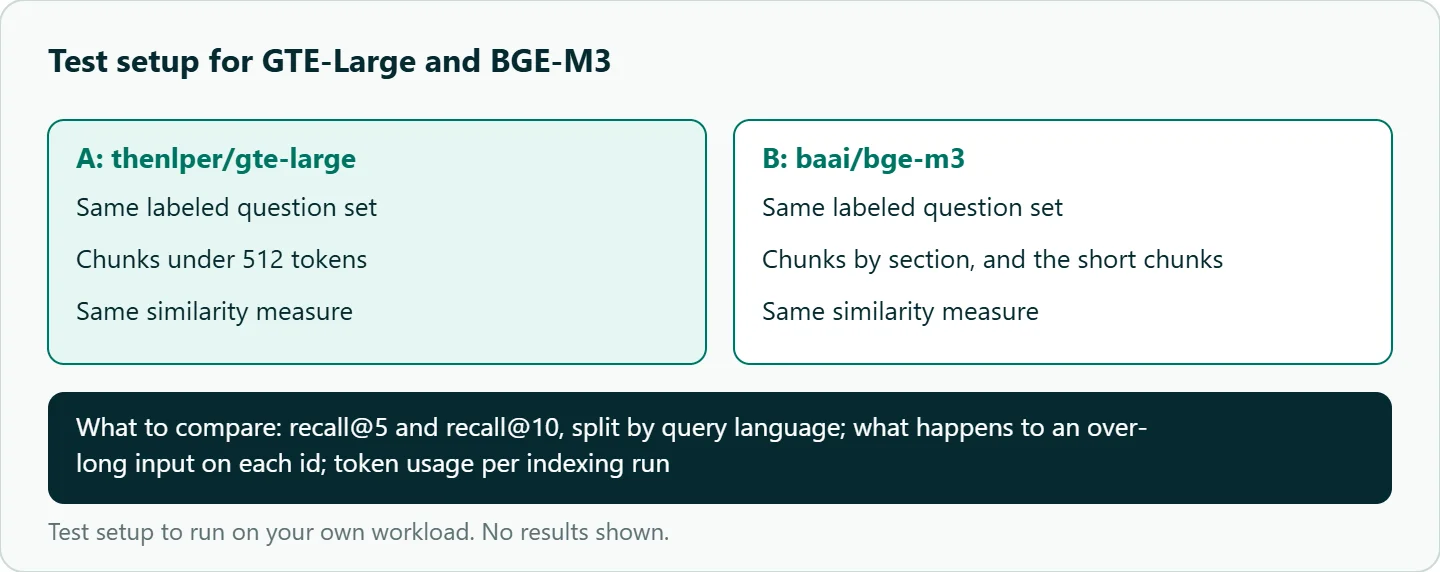
- Collect 50 to 100 real questions from logs or support tickets, in the languages your users actually write in, including mixed-language ones.
- For each question, mark the passage or passages that answer it. This labeled set is the work; everything else is a script.
- Chunk the corpus twice: under 512 tokens for GTE-Large, and by section for BGE-M3. Also build a BGE-M3 index from the short chunks, so you can tell the model's effect from the chunking effect.
- Embed each chunk set and each question with the matching model, using the same similarity measure in all three indexes.
- Compute recall@5 and recall@10: how often a correct passage appears in the top results. Break the numbers down by query language.
- Send one input longer than 512 tokens to GTE-Large and one longer than 8,194 tokens to BGE-M3. Note whether each call succeeds and what
usage.prompt_tokensreports. - Check token usage per indexing run in the console and compare against each model's rate on its page.
A minimal recall check, assuming you already have vectors and a labeled set:
import numpy as np

def recall_at_k(q_vecs, d_vecs, gold, k=5):
    d = np.array(d_vecs); d /= np.linalg.norm(d, axis=1, keepdims=True)
    hits = 0
    for qi, q in enumerate(q_vecs):
        q = np.array(q) / np.linalg.norm(q)
        top = np.argsort(-(d @ q))[:k]
        hits += any(i in gold[qi] for i in top)
    return hits / len(q_vecs)
| What you see | Use |
|---|---|
| English-only questions, scores close | thenlper/gte-large, keep it simple |
| Non-English or mixed questions score lower on GTE-Large | baai/bge-m3 |
| BGE-M3 short chunks beat BGE-M3 long chunks | baai/bge-m3 with short chunks |
| Exact codes or names missed by both | Add a keyword index and rerank |
Our take: If your corpus and your users are English and your passages are short, GTE-Large is enough, and switching a working index to chase a newer model is effort with no clear payoff. The moment another language enters either the documents or the questions, use BGE-M3. An English-only model cannot be tuned into a multilingual one, while BGE-M3 handles the English part as well.
Running it on OceanToken
Both ids run at the OpenAI-compatible base URL https://api.oceantoken.ai/v1 on POST /v1/embeddings, and client.embeddings.create() works with only the base URL and key changed. Moving between them is a change of model id, so building the two test indexes above needs no second account and no new client code. The same key covers the rerank endpoint for hybrid search, along with the chat models you generate answers with, on one prepaid balance with no subscription.
Embeddings are charged per input token, so the cost of an indexing run is the token count of your corpus times the model's rate. See the current rate on each model page, or compare the whole category on /cheapest/embedding-api.
FAQ
Is BGE-M3 better than GTE-Large for English? Not necessarily. For short English passages we would keep GTE-Large until your own recall test shows BGE-M3 ahead, because published scores are measured on someone else's corpus.
Can I get BGE-M3 sparse vectors through the API? Not on the OpenAI-compatible /v1/embeddings call: it returns one dense vector per input. For keyword matching, run a BM25 index alongside and merge the results.
What happens if I send GTE-Large more than 512 tokens? The model card says longer text is truncated to 512 tokens, so the vector ignores the rest. Keep chunks under the limit and check usage.prompt_tokens on a test input.
Do I need a query prefix for either model? BAAI's card says BGE-M3 no longer needs instructions on queries, and the GTE-Large card's examples embed plain text.
Can I mix GTE-Large and BGE-M3 vectors in one index? No. Both are 1024-dimension, so the database will accept them, but vectors from different models are not comparable and results will be wrong without any error.
Sources
- OceanToken docs: GTE-Large spec (JSON) (checked 2026-11-21)
- OceanToken docs: BGE-M3 spec (JSON) (checked 2026-11-21)
- OceanToken docs: Embeddings and rerank (checked 2026-11-21)
- OceanToken docs: API reference (checked 2026-11-21)
- OceanToken: bge-m3 model page (checked 2026-11-21)
- thenlper: gte-large model card (checked 2026-11-21)
- BAAI: bge-m3 model card (checked 2026-11-21)
- Chen et al.: BGE M3-Embedding paper (arXiv) (checked 2026-11-21)
Get your OceanToken API key
- Create an OceanToken account and an API key.
- Copy the snippet below, paste your key, and run it.
- Check the current rate on /cheapest/embedding-api.
curl https://api.oceantoken.ai/v1/embeddings \
  -H "Authorization: Bearer $OCEANTOKEN_API_KEY" \
  -H "Content-Type: application/json" \
  -d '{"model": "baai/bge-m3", "input": ["How long do refunds take?", "退款需要多长时间?"]}'
More from the blog
Qwen3.8 Max vs GLM 5.3 vs DeepSeek V4 Pro
Qwen3.8 Max vs GLM 5.3 vs DeepSeek V4 Pro by job: coding agents, tool calling and JSON, long context, and how each handles thinking and reasoning_content.
Wan 3.0 Prime vs Veo 3.1: Image to Video
Wan 3.0 Prime vs Veo 3.1 image to video on one API: first and last frame fields, reference image limits, lengths, shapes and which model fits each shot type.
Kimi K3 vs Kimi K3.1 Pro: Which to Use
Kimi K3 vs Kimi K3.1 Pro by job: which takes tools, JSON and video on our API, how thinking and reasoning_content work, and what to change when you migrate.